
Occasionally I needed to choose the greatest or least value from a set of columns during a project in SQL Server and use that value to make another decision in my logic. For example, choosing the most recent or oldest date. Depending on how the data is modeled, this could be relatively simple and use a MAX or MIN function for a list of tabular data, or using UNPIVOT to covert columns to rows then use MAX / MIN. It gets a little trickier when joining data and the columns needed to evaluate are in different tables. The new(er) GREATEST and LEAST Functions in SQL Server 2022 are a time saver in this situation.
Greatest and Least Functions
So, what do the greatest and least functions do? Quite simply, they do what their names say they do. Each function returns either the greatest or least value from the list of input values. The functions will return the value as the data type of the input values. If input values are of mixed types, as long as they can be converted to the same data type, then the functions will work as expected. The inputs cannot be a mix of dates and strings for example.
Handling NULLs
Sometimes columns will contain NULLs which could be a completely different article on why this is or is not a good data design practice; however, for the scope of this article when using GREATEST or LEAST functions, if at least one input value is NOT NULL, any other NULLs in the input list will be ignored when evaluating the function.
If the data contains NULLs, consider setting them to a default value based upon any requirements using a COALESCE. ISNULL function, or other flavor of NULL handling.
Example Setup
In the following example, I’ll set up an employee table with ID, First Name, Last Name, Hire Date, Inserted Date, and Updated Date. Inserted and Updated dates will be randomized to use in the GREATEST and LEAST functions.
/*SETUP EMPLOYEE TABLE*/
DROP TABLE IF EXISTS #tbl_employees;

CREATE TABLE #tbl_employees(
	emp_id INT IDENTITY(1,1),
	fname VARCHAR(50),
	lname VARCHAR(50),
	hire_date DATE,
	inserted_date DATETIME DEFAULT GETDATE(),
	updated_date DATETIME DEFAULT GETDATE()
	);

/*INSERT SOME TEST DATA*/
INSERT INTO #tbl_employees
(fname,lname,hire_date)
VALUES
('Bob','Smith','1/1/2023'),
('Sally','Strothers','7/15/2023'),
('Wilt','Chamberlain','2/16/2023'),
('Joe','Montana','12/16/2022'),
('Wayne','Gretzky','3/15/2020'),
('Dale','Murphy','3/3/2003');

/*GENERATE INSERTED/UPDATED DATES BASED ON HIRE DATE: SIMULATE XACTIONS*/
;WITH x AS(
SELECT
	emp_id,
	ins.date AS ins_date
	,DATEADD(MINUTE,RAND(e.emp_id)*RAND(DATEDIFF(s,'1/1/1970',ins.date))*(60*60*365),CONVERT(DATETIME,ins.date)) AS upd_date
FROM
	#tbl_employees AS e
CROSS APPLY(
	SELECT DATEADD(ms,RAND(e.emp_id)*RAND(DATEDIFF(s,'1/1/1970',e.hire_date))*(60*60*365),CONVERT(DATETIME,e.hire_date))
	) AS ins(date)
)
UPDATE e
SET
	inserted_date = x.ins_date,
	updated_date = x.upd_date
FROM
	#tbl_employees AS e
JOIN
	x
ON
	e.emp_id = x.emp_id;

/*SHOW EMPLOYEES*/
SELECT * FROM #tbl_employees;
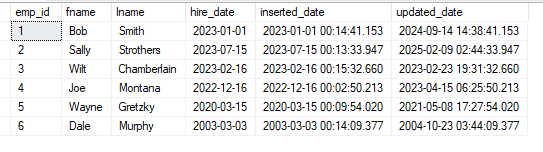
Using GREATEST and LEAST
Suppose your HR Partner requested two lists of employees; one with employees whose records were added or updated prior to 1/1/2023; and the other being employees whose records were added or updated on or after 1/1/2023. Both could be solved in this simple example using an OR statement in the WHERE clause.
/*FIND EMPLOYEE RECORDS INSERTED OR UPDATED PRIOR TO 2023*/
SELECT * FROM #tbl_employees
WHERE
	inserted_date < '1/1/2023'
	OR
	updated_date < '1/1/2023';

/*FIND EMPLOYEE RECORDS INSERTED OR UPDATED AFTER TO 2023*/
SELECT * FROM #tbl_employees
WHERE
	inserted_date >= '1/1/2023'
	OR
	updated_date >= '1/1/2023';

The code above is straightforward and works as I would expect in this example, but I can use GREATEST and LEAST to get the same results as such:
/*FIND EMPLOYEE RECORDS INSERTED OR UPDATED PRIOR TO 2023*/
SELECT * FROM #tbl_employees WHERE LEAST(inserted_date,updated_date) < '1/1/2023';

/*FIND EMPLOYEE RECORDS INSERTED OR UPDATED AFTER TO 2023*/

SELECT * FROM #tbl_employees WHERE GREATEST(inserted_date,updated_date) >='1/1/2023';
Notice the results are the same in both sets of queries. Changing the queries didn’t gain anything in query plans either – both are identical.
Using GREATEST and LEAST with JOINS
Where the time saver with GREATEST and LEAST comes into play is with joined data. I’m going to add two additional tables to the example, a department table and a bridge table to map employees to departments. Additionally, I’ll randomize the inserted and updated dates on these tables.
DROP TABLE IF EXISTS #tbl_departments
CREATE TABLE #tbl_departments(
	dept_id INT IDENTITY(1,1),
	dept_name VARCHAR(100),
	inserted_date DATETIME DEFAULT GETDATE(),
	updated_date DATETIME DEFAULT GETDATE()
	)

INSERT INTO #tbl_departments
(
    dept_name
)
VALUES
('HR'),('Accounting'),('Information Technology');

;WITH x AS(
SELECT
	dept_id,
	ins.date AS ins_date
	,DATEADD(ms,RAND(d.dept_id)*RAND(DATEDIFF(s,'1/1/1970',GETDATE()-RAND(1)*30))*(60*60*365),CONVERT(DATETIME,GETDATE()-30)) AS upd_date
FROM
	#tbl_departments AS d
CROSS APPLY(
	SELECT DATEADD(ms,RAND(d.dept_id)*RAND(DATEDIFF(s,'1/1/1970',GETDATE()-30))*(60*60*365),CONVERT(DATETIME,GETDATE()-30))
	) AS ins(date)
)
UPDATE d
SET
	inserted_date = x.ins_date,
	updated_date = x.upd_date
FROM
	#tbl_departments AS d
JOIN
	x
ON
	d.dept_id = x.dept_id;

CREATE TABLE #tbl_emp_dept(
	emp_dept_id INT IDENTITY(1,1),
	emp_id INT,
	dept_id INT,
	inserted_date DATETIME DEFAULT GETDATE (),
	updated_date DATETIME DEFAULT GETDATE()
	)

INSERT INTO #tbl_emp_dept
(emp_id,dept_id)
VALUES
(1,1),(2,3),(3,2),(4,1),(5,1),(6,2)


;WITH x AS(
SELECT
	e.emp_id,
	ins.date AS ins_date
	,DATEADD(MINUTE,RAND(e.emp_id)*RAND(DATEDIFF(s,'1/1/1970',ins.date))*(60*60*365),CONVERT(DATETIME,ins.date)) AS upd_date
FROM
	#tbl_employees AS e
	JOIN #tbl_emp_dept AS d
	ON d.emp_id = e.emp_id
CROSS APPLY(
	SELECT DATEADD(ms,RAND(e.emp_id)*RAND(DATEDIFF(s,'1/1/1970',e.hire_date))*(60*60*365),CONVERT(DATETIME,e.hire_date))
	) AS ins(date)
)
UPDATE e
SET
	inserted_date = x.ins_date,
	updated_date = x.upd_date
FROM
	#tbl_emp_dept AS e
JOIN
	x
ON
	e.emp_id = x.emp_id;

/*JOIN NEW TABLES*/
SELECT
	e.emp_id,
	e.fname,
	e.lname,
	e.hire_date,
	d.dept_name
FROM
	#tbl_employees AS e
JOIN
	#tbl_emp_dept AS ed
ON
	e.emp_id = ed.emp_id
JOIN
	#tbl_departments AS d
ON
	d.dept_id = ed.dept_id
Now, to get the full picture of the employees, I can join these three tables together
/*JOIN NEW TABLES*/
SELECT
	e.emp_id,
	e.fname,
	e.lname,
	e.hire_date,
	d.dept_name
FROM
	#tbl_employees AS e
JOIN
	#tbl_emp_dept AS ed
ON
	e.emp_id = ed.emp_id
JOIN
	#tbl_departments AS d
ON
	d.dept_id = ed.dept_id

Another HR Request
Suppose HR asks for a list of employees, the first record insertion and the date of the last record change – meaning department change, name change, or department name change. Now the query to get that can be a bit more complicated because more tables are involved. I’d have to check for an employee record change, a bridge record change, and a department record change, OR I could use GREATEST and LEAST functions.
SELECT
	e.emp_id,
	e.fname,
	e.lname,
	e.hire_date,
	d.dept_name,
	LEAST(e.inserted_date,ed.inserted_date,d.inserted_date) AS earliest_record_insert,
	GREATEST(e.updated_date,ed.updated_date,d.updated_date) AS last_record_update
FROM
	#tbl_employees AS e
JOIN
	#tbl_emp_dept AS ed
ON
	e.emp_id = ed.emp_id
JOIN
	#tbl_departments AS d
ON
	d.dept_id = ed.dept_id
In the code above, I can quickly and easily select the LEAST inserted date and the GREATEST updated date from each of the tables in my join to satisfy the HR request. While the functions produce the expected results, what the function doesn’t return is from what table in the join the value was selected. If there is a use case need for this, then the GREATEST / LEAST function wouldn’t be the best choice.

Conclusion
With SQL Server 2022 addition of GREATEST and LEAST developers have a quick method for returning the greatest or least value from a list of values or columns. In my experience I’ve needed this functionality, but had to write custom code with UNPIVOT or other method to accomplish the same task. Read more about GREATEST and LEAST in the Microsoft documentation and happy SQL’ing!
 Eric Heilman
2 thoughts on “SQL Server: Greatest and Least Functions”