
In a recent post, I discussed the GREATEST and LEAST functions in SQL Server 2022. Both of these functions exist in Snowflake, but after some testing, I found that they behave differently in Snowflake than in SQL Server when dealing with NULL values. While the functions behave differently, there are options to “get around” the NULL values in Snowflake and replicate the behavior from SQL Server.
Test Data Setup
In the SQL Server post, I used the RAND function in a CROSS APPLY to generate sample data. Rather than convert all the SQL Server T-SQL to Snowflake SQL to replicate the behavior, I will hard-code the data from SQL Server into appropriate INSERT scripts for Snowflake to the demos look at the same data. I’m using a TRANSIENT table with 0 days of TimeTravel. This ensures this table does not use additional storage for TimeTravel or Fail Safe. Using transient tables instead of temporary tables allows me to come back to my work in the event of a session or connection loss.
DROP TABLE IF EXISTS tbl_employees;

CREATE TRANSIENT TABLE tbl_employees
DATA_RETENTION_TIME_IN_DAYS=0
(
	emp_id INT IDENTITY(1,1),
	fname VARCHAR(50),
	lname VARCHAR(50),
	hire_date DATE,
	inserted_date TIMESTAMP_TZ DEFAULT CURRENT_TIMESTAMP(),
	updated_date TIMESTAMP_TZ DEFAULT CURRENT_TIMESTAMP()
	);

/*INSERT TEST DATA*/
INSERT INTO tbl_employees
(fname,lname,hire_date,inserted_date,updated_date)
VALUES
('Bob','Smith','1/1/2023','2023-01-01 00:14:41.153','2024-09-14 14:38:41.153'),
('Sally','Strothers','7/15/2023','2023-07-15 00:13:33.947','2025-02-09 02:44:33.947'),
('Wilt','Chamberlain','2/16/2023','2023-02-16 00:15:32.660','2023-02-23 13:31:32.660'),
('Joe','Montana','12/16/2022','2022-12-16 00:02:50.213','2023-04-15 06:25:50.213'),
('Wayne','Gretzky','3/15/2020','202-03-15 00:09:54.020','2021-05-08 17:27:54.020'),
('Dale','Murphy','3/3/2003','2003-03-03 00:14:09.377','2004-10-23 03:44:09.377');


/*SHOW EMPLOYEES*/
SELECT * FROM tbl_employees;

Using GREATEST and LEAST
In the prior post, the first example of using GREATEST and LEAST was to support an HR request for two employee lists; one with employees whose records were added or updated prior to 1/1/2023; and the other being employees whose records were added or updated on or after 1/1/2023. The same query syntax from SQL Server works in Snowflake.
/*FIND EMPLOYEE RECORDS INSERTED OR UPDATED PRIOR TO 2023*/
SELECT * FROM tbl_employees WHERE LEAST(inserted_date,updated_date) < '1/1/2023';

/*FIND EMPLOYEE RECORDS INSERTED OR UPDATED AFTER TO 2023*/
SELECT * FROM tbl_employees WHERE GREATEST(inserted_date,updated_date) >='1/1/2023';


Using GREATEST and LEAST in JOINS
Similar to SQL Server the GREATEST and LEAST functions in Snowflake have N number of input values, so using the functions to compare values across multiple columns in multiple tables is simple! To illustrate, I’ll add the TBL_DEPARTMENT and TBL_EMP_DEPT tables from my prior SQL Server example. Similarly to the employee table, I’ll simplify the example and include explicit insert statements for each table.
/*DEPT TABLE*/
DROP TABLE IF EXISTS TBL_DEPARTMENTS;
CREATE TRANSIENT TABLE TBL_DEPARTMENTS
DATA_RETENTION_TIME_IN_DAYS=0(
DEPT_ID INTEGER IDENTITY(1,1),
DEPT_NAME VARCHAR(100),
INSERTED_DATE TIMESTAMP_TZ DEFAULT CURRENT_TIMESTAMP(),
UPDATED_DATE TIMESTAMP_TZ DEFAULT CURRENT_TIMESTAMP()
);

/*EMP DEPT BRIDGE*/
DROP TABLE IF EXISTS TBL_EMP_DEPT;
CREATE TRANSIENT TABLE TBL_EMP_DEPT
DATA_RETENTION_TIME_IN_DAYS =0(
EMP_DEPT_ID INTEGER IDENTITY(1,1),
EMP_ID INT,
DEPT_ID INT,
INSERTED_DATE TIMESTAMP_TZ DEFAULT CURRENT_TIMESTAMP(),
UPDATED_DATE TIMESTAMP_TZ DEFAULT CURRENT_TIMESTAMP()
);


/*INSERTS*/
INSERT INTO TBL_DEPARTMENTS(DEPT_NAME,INSERTED_DATE,UPDATED_DATE)
VALUES
('HR','2020-01-01 00:00:00.000','2020-01-01 00:00:00.000'),
('ACCOUNTING','2020-01-01 00:00:00.000','2020-01-01 00:00:00.000'),
('INFORMATION TECHNOLOGY','2020-01-01 00:00:00.000','2020-01-01 00:00:00.000');

INSERT INTO TBL_EMP_DEPT(EMP_ID,DEPT_ID,INSERTED_DATE,UPDATED_DATE)
VALUES
(1,1,'2023-01-01 00:14:41.153','2023-09-14 14:38:41.153'),
(2,3,'2023-07-15 00:13:33.947','2023-09-02 02:44:33.947'),
(3,2,'2023-02-16 00:15:32.660','2023-02-23 19:31:32.660'),
(4,1,'2022-12-16 00:02:50.213','2023-04-15 06:25:50.213'),
(5,1,'2020-03-15 00:09:54.020','2021-05-08 17:27:54.020'),
(6,2,'2003-03-03 00:14:09.377','2004-10-23 03:44:09.377');
Revisiting Another HR Request
Suppose HR asks for a list of employees, the first record insertion, and the date of the last record change – meaning department change, name change, or department name change. Similar to SQL Server, I can join the tables and use the GREATEST and LEAST functions in Snowflake to achieve the same results. One slight change from the SQL Server example is I am changing to LEFT JOINs rather than INNER JOIN. By doing so, I include employees who may not have been assigned a department yet (this will come into play in another example later).
SELECT
	e.emp_id,
	e.fname,
	e.lname,
	e.hire_date,
	d.dept_name,
	LEAST(e.inserted_date,ed.inserted_date,d.inserted_date) AS earliest_record_insert,
	GREATEST(e.updated_date,ed.updated_date,d.updated_date) AS last_record_update
FROM
	tbl_employees AS e
LEFT JOIN
	tbl_emp_dept AS ed
ON
	e.emp_id = ed.emp_id
LEFT JOIN
	tbl_departments AS d
ON
	d.dept_id = ed.dept_id;

New Employee
A new employee joins the company and has not been assigned to a department in the data system yet. How does that change the results of the HR request above?
/*NEW HIRE*/
INSERT INTO tbl_employees
(fname,lname,hire_date)
VALUES
('Jack','Sparrow','10/30/2023');

/*HR REQUEST BLOCK*/
SELECT
	e.emp_id,
	e.fname,
	e.lname,
	e.hire_date,
	d.dept_name,
	LEAST(e.inserted_date,ed.inserted_date,d.inserted_date) AS earliest_record_insert,
	GREATEST(e.updated_date,ed.updated_date,d.updated_date) AS last_record_update
FROM
	tbl_employees AS e
LEFT JOIN
	tbl_emp_dept AS ed
ON
	e.emp_id = ed.emp_id
LEFT JOIN
	tbl_departments AS d
ON
	d.dept_id = ed.dept_id;

The code works and the DEPT_NAME is NULL as expected; however, EARLIEST_RECORD_INSERT and LAST_RECORD_UPDATE are NULL as well. This is where Snowflake and SQL Server diverge on how GREATEST and LEAST functions work.
If one or more arguments aren’t
MicROSOFT SQL SERVER Online DOcumentationNULL, thenNULLarguments are ignored during comparison. If all arguments areNULL, thenGREATEST/LEAST returnsNULL.
Returns the largest value from a list of expressions. If any of the argument values is NULL, the result is NULL. GREATEST/LEAST supports all data types, including VARIANT.
Snowflake Online Documentation
SQL Server will ignore NULLs by default if at least one input value is not null; however, Snowflake will return NULL if any input value is NULL. So to solve for NULL values in Snowflake, two other functions can be used ARRAY_MAX and ARRAY_MIN.
ARRAY_MAX and ARRAY_MIN
ARRAY_MAX and ARRAY_MIN function similarly to GREATEST and LEAST in that they return the min or max value from an array in Snowflake that is not NULL. These functions are primarily used with Semi-Structured data such as JSON; however, by wrapping the column(s) needed in square brackets, I can use them for this example. One caveat is that ARRAY_MAX and ARRAY_MIN return as a VARIANT datatype. In my example, since I am using the functions on TIMESTAMP_TZ columns, I will need to convert the ARRAY_MAX/ARRAY_MIN output to TIMESTAMP_TZ.
SELECT
	e.emp_id,
	e.fname,
	e.lname,
	e.hire_date,
	d.dept_name,
	ARRAY_MIN([e.inserted_date,ed.inserted_date,d.inserted_date])::TIMESTAMP_TZ AS earliest_record_insert,
	ARRAY_MAX([e.updated_date,ed.updated_date,d.updated_date])::TIMESTAMP_TZ AS last_record_update
FROM
	tbl_employees AS e
LEFT JOIN
	tbl_emp_dept AS ed
ON
	e.emp_id = ed.emp_id
LEFT JOIN
	tbl_departments AS d
ON
	d.dept_id = ed.dept_id;
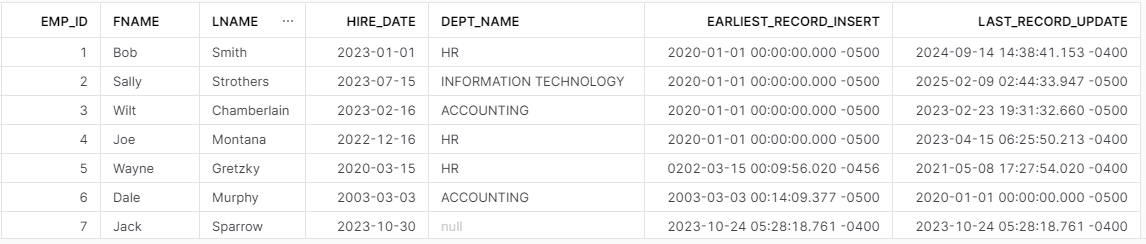
Using ARRAY_MAX and ARRAY_MIN in the HR request now properly displays the earliest insert and latest update for new employee Jack Sparrow; which correspond to the insert and update date on his record in TBL_EMPLOYEE.
Wrapping Up
Snowflake’s GREATEST and LEAST functions operate similarly to those in SQL Server except for handling NULLS. SQL Server’s method is not superior, nor is Snowflake’s; they’re just different and it is up to the developer to understand the differences in how they operate.
Snowflake provides ARRAY_MAX and ARRAY_MIN as an alternative method when NULLs need to be ignored; however, my recommendation is to avoid using NULLs wherever possible.
 Eric Heilman