
In a previous article, I showed how to set a row access policy on a view to limit the rows returned by a query dependent upon the user’s role in Snowflake. The row access policy had the roles I cared about hard coded into the policy code; however, in a real-world scenario, that isn’t manageable as systems grow. Remember that to change the row access policy code, the policy must be dropped from each object referencing it. In large data platforms, that could be a lot of objects and extremely time-consuming.
Row Access Policy Review
Snowflake row access policies only return a true or false value, which tells the query engine whether or not to output the row to the query results. In the example I shared previously, the REGION_NAME value and the user’s role were used in the row access policy to return a true or false value. Also, recall that I used hierarchical roles to allow the SALES_MGR role to “see” the same regions as both the AM_EU_SALES and NON_AM_EU_SALES roles without explicitly specifying the SALES_MGR role in the access policy.
Table-Driven Row Access Policy
So why would I want to adjust my row access policy when it works just fine now? Simple – change management. Using a table to drive the row access policy isn’t a magic bullet. It will ease the pain of making some changes; however, if the overall row access policy needs a change, such as adding a new column to evaluate, the policy must still be dropped from all objects referencing it first before updating the policy code.
Table Setup
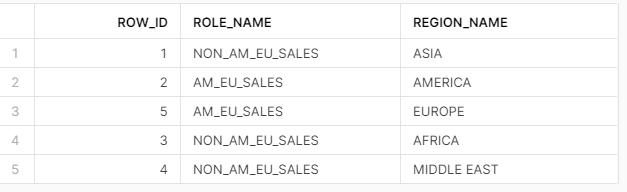
For this example, I’ll create a simple table that stores the USER_ROLE and REGION_NAME values. This table will be used as the source for the table-driven row access policy. Additionally, I’ll drop the existing row access policy from the view VW_SALES_DATA. Finally, I’ll populate the table with the USER_ROLE and REGION_NAME values corresponding to the existing row access policy. Note that just like the current policy, SALES_MGR will not be inserted into the table.
/*CONNECT TO PROPER DB/SCHEMA/ROLE*/
USE ROLE ST_DEMO_ROLE;
USE SCHEMA STREAMLIT_DB.STREAMLIT_DATA;
USE WAREHOUSE ST_DEMO_XS_WH;

/*CREATE TABLE FOR ROLE STORAGE*/
CREATE OR REPLACE TABLE TBL_ROW_ACCESS(
    ROW_ID NUMBER(5,0)
        AUTOINCREMENT START WITH 1 INCREMENT BY 1
    ,ROLE_NAME VARCHAR(100)
    ,REGION_NAME VARCHAR(100)
);


/*DROP CURRENT ROW ACCESS POLICY*/
ALTER VIEW VW_SALES_DATA
    DROP ROW ACCESS POLICY
        REGION_SALES_ACCESS;

/*LOAD DATA TO TABLE BASED
ON CURRENT ROW ACCESS POLICY*/
TRUNCATE TABLE TBL_ROW_ACCESS;

INSERT INTO TBL_ROW_ACCESS(REGION_NAME,ROLE_NAME)
WITH RG AS(
SELECT REGION_NAME FROM VW_SALES_DATA GROUP BY REGION_NAME
)
SELECT
REGION_NAME,
CASE
        WHEN  REGION_NAME IN('AMERICA', 'EUROPE') THEN 'AM_EU_SALES'
        WHEN REGION_NAME NOT IN('AMERICA', 'EUROPE') THEN 'NON_AM_EU_SALES'
        ELSE NULL
    END AS ROLE_NAME
FROM
    RG;

/*VERIFY ENTRY*/
SELECT * FROM TBL_ROW_ACCESS;
Row Access Policy
Remember that row access policies need only return true or false. As such, I can use the EXISTS keyword to return true or false from a query against TBL_ROW_ACCESS using the current user’s role and the view’s region name value to determine if the user has access to the row. As I did in the prior policy, the IS_ROLE_IN_SESSION function helps traverse the hierarchical roles for access. Once the policy is updated, I’ll also apply it to VW_SALES_DATA
/*ALTER ROW ACCESS POLICY
TO USE TABLE*/
CREATE OR REPLACE ROW ACCESS POLICY REGION_SALES_ACCESS
    AS (REGION_NAME VARCHAR) RETURNS BOOLEAN ->
    EXISTS(
        SELECT 1 FROM TBL_ROW_ACCESS AS RA
        WHERE IS_ROLE_IN_SESSION(RA.ROLE_NAME)
        AND RA.REGION_NAME = REGION_NAME);

/*APPLY TO VIEW*/
    ALTER VIEW VW_SALES_DATA
ADD
    ROW ACCESS POLICY
REGION_SALES_ACCESS ON(REGION_NAME);
Verifying Access
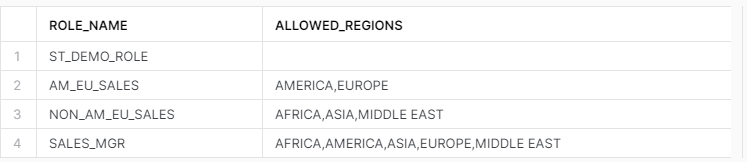
Using the same code block from the previous article, I’ll run through each role and capture the list of regions it can access from VW_SALES_DATA. The output from this query should look familiar as AM_EU_SALES and NON_AM_EU_SALES have limited regions, SALES_MGR has all regions, and ST_DEMO_ROLE has no regions listed.
/*CREATE TEMP TABLE
TO STORE RESULTS
*/
USE ROLE ST_DEMO_ROLE;
CREATE OR REPLACE TEMPORARY TABLE TBL_ROLE_ACCESS(
    ROLE_NAME VARCHAR(100),
    ALLOWED_REGIONS VARCHAR(100)
);
GRANT INSERT ON TABLE TBL_ROLE_ACCESS TO ROLE SNOW_SALES;


/*RUN INSERT FOR EACH ROLE*/
USE ROLE AM_EU_SALES;
USE ROLE NON_AM_EU_SALES;
USE ROLE SALES_MGR;
USE ROLE ST_DEMO_ROLE;

INSERT INTO TBL_ROLE_ACCESS
SELECT DISTINCT CURRENT_ROLE(),
LISTAGG(DISTINCT REGION_NAME,',') WITHIN GROUP (ORDER BY REGION_NAME) AS ALLOWED_REGIONS
FROM VW_SALES_DATA;

/*SHOW ALLOWED REGIONS BY ROLE*/
SELECT * FROM TBL_ROLE_ACCESS;
Real-World Use Case
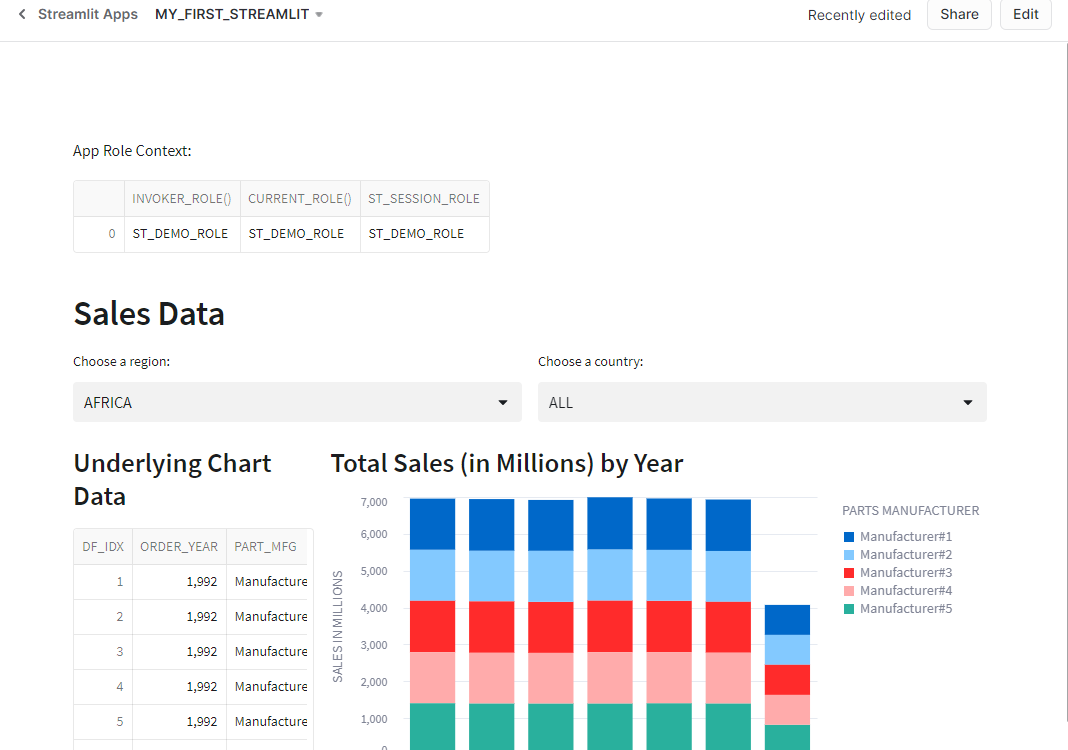
Now that I have a row access policy added to VW_SALES_DATA, which also drives the MY_FIRST_STREAMLIT app I’ve built in other articles, I’ve “broken” my app – it displays no data. The app runs under the context of the ST_DEMO_ROLE role, which doesn’t have access to any data under the new row access policy. Thankfully, now that I’ve converted to a table-driven approach, I can simply add records to TBL_ROW_ACCESS for the regions I want ST_DEMO_ROLE to access and the app will be repaired.

/*FIX STREAMLIT*/
USE ROLE ST_DEMO_ROLE;
USE SCHEMA STREAMLIT_DB.STREAMLIT_DATA;

INSERT INTO TBL_ROW_ACCESS
    (ROLE_NAME,REGION_NAME)
SELECT
    'ST_DEMO_ROLE' as ROLE_NAME
    ,REGION_NAME
FROM TBL_ROW_ACCESS;
Conclusion
Snowflake row access policies can be quite powerful for limiting data access. Like many things in Snowflake, proper planning during policy implementation will pay dividends in the long run for ease of management. The example shown here is relatively basic but illustrates how to create a table to manage access, create or update a row access policy to use the table, and a real-world example of updating data access using the table.
 Eric Heilman
One thought on “Snowflake: Table-Driven Row Access Policies”