
In a recent article, I showed a local Streamlit app that enforces role-based row access policies based on the Snowflake role used in the session variable. The selectbox in the app simulated how the app would act as users in different roles executed the app. Are native Streamlit apps capable of using RBAC for Row Access? The short answer is yes; however, the solution I found is quite complex.
This article assumes that either the hard-coded or table-driven row access policy is in place from earlier articles. The code samples shown will not work if one of those row access policy methods is not in place.
App Role in Native Streamlit
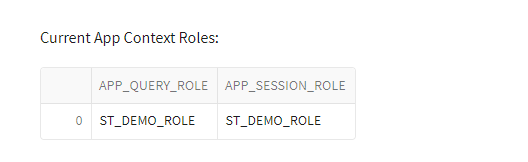
Since native Streamlit apps are objects in Snowflake, they behave like all other objects in Snowflake from an ownership and privileges standpoint. As such, when running the app, any queries against Snowflake will be executed by the app owner role, regardless of the current user’s role. Being a newer Streamlit developer, I was initially confused and frustrated with this distinction. The only supported session connection method as of the time of this article is get_current_session. When using this connection method, session.get_current_role returns the user’s current role, not the app owner role used to execute queries against Snowflake.
Session Role vs App Role
Adding a few lines of code to the demo app to display the current session role and current app roles will help illustrate the role differences at execution time.
#GET CURRENT SESSION ROLE
sess_curr_role = session.get_current_role().strip('"')
#QUERY SNOWFLAKE AND WRITE TO DATAFRAME
app_context_sql = f"""
    SELECT
    CURRENT_ROLE() AS APP_QUERY_ROLE,
    '{sess_curr_role}' as APP_SESSION_ROLE
"""
df_app_context = session.sql(app_context_sql).collect()
#PRINT TO SCREEN
st.write("Current App Context Roles:")
st.dataframe(data=df_app_context)
Changing Session Role
There appear to be plans for support in native Streamlit apps to support changing a session role through the use_role function like non-native Streamlit apps. Attempts to use this function return an error in the app. Additionally, adding a USE ROLE command in any SQL commands in the app also returns an error.

Using Session Role in Native Steamlit App
Through several failed iterations, I found an approach that works with native Steamlit apps using the user’s session role to enforce row access policies. Admittedly, this solution is not ideal for all applications. It adds data and object management complexity, even in small data warehouse systems.
One of the Snowflake features implemented in this solution is specifying the role used when calling procedures. Snowflake allows procedures to be executed as the OWNER or as the CALLER of the procedure. This feature will allow the native Streamlit app to call a procedure as the app role, but the procedure will execute as the procedure’s owner role which will then be used to enforce the row access policy.
Role Hierarchy Realignment
Before making any app changes, a few roles need to be realignment roles in Snowflake to move the app owner (ST_DEMO_ROLE) to the top of the hierarchy and break the relationship between ST_APP_USERS and ST_DEMO_ROLE. Finally, adding ST_APP_USERS as a child to SNOW_SALES allows all roles in the hierarchy access to the Streamlit app.

/*ADD SALES ORG ROLE HIERARCHY TO ST_DEMO_ROLE FOR STREAMLIT*/
USE ROLE SECURITYADMIN;
GRANT ROLE SALES_MGR TO ROLE ST_DEMO_ROLE;
/*GRANT SNOW_SALES ACCESS TO APP*/
GRANT ROLE ST_APP_USERS TO ROLE SNOW_SALES;
/*CLEAN UP HIERACHICAL ROLES*/
REVOKE ROLE ST_APP_USERS FROM ROLE ST_DEMO_ROLE;
REVOKE ROLE SALES_MGR FROM ROLE SYSADMIN;

Create Role-Specific Schema and Procedure
The sample row access policy limits data in the VW_SALES_DATA view based upon the REGION_NAME. The remainder of the app data is filtered based on the selected REGION_NAME. By limiting the REGION_NAME values in the selectbox in the app by role, the rest of the app will naturally filter itself.
ST_DEMO_ROLE_SCH Schema Creation
First, create a new schema using the app owner role name as part of the schema name. Doing so violates most object naming best practices; however, this solution leverages the session role to modify app behavior.
/*BEGIN STREAMLIT DB MODS*/
USE ROLE ST_DEMO_ROLE;
USE WAREHOUSE ST_DEMO_XS_WH;
USE DATABASE STREAMLIT_DB;
/*CREATE NEW SCHEMA FOR ST_DEMO_ROLE*/
CREATE OR REPLACE SCHEMA ST_DEMO_ROLE_SCH;
USP_GET_REGION Procedure
Next, create a stored procedure that replaces the SQL code in the app to return the REGION_NAME values. The procedure must be executed as OWNER rather than CALLER. Using execute as owner is the crux for this solution to running Snowflake queries as non-app owner roles in a native Streamlit.
/*CREATE NEW PROCEUDRE*/
USE SCHEMA ST_DEMO_ROLE_SCH;
CREATE OR REPLACE PROCEDURE USP_GET_REGION()
RETURNS TABLE(REGION_NAME VARCHAR)
LANGUAGE SQL
EXECUTE AS OWNER
AS
$$
DECLARE
    df_region RESULTSET;
BEGIN
    /*GET THE LIST OF REGIONS*/
    df_region := (
    SELECT
        REGION_NAME
    FROM
        STREAMLIT_DATA.VW_SALES_DATA
    GROUP BY
        REGION_NAME
    ORDER BY
        REGION_NAME);
    /*RETURN THE REGION LIST*/
    RETURN TABLE(df_region);
END;
$$;
Add Procedure to Streamlit App
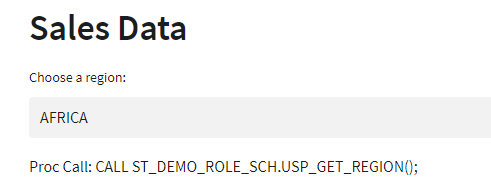
Finally, add the procedure to the Streamlit app to replace the SQL command and include steps to dynamically set the schema name in the procedure call and write the command to the screen. Adding the additional screen output may not have real app value in a practical application, but demonstrates this solution’s execution.
#COL1 = REGION
with col1:
    region_sql =f"""
    CALL {sess_curr_role}_SCH.USP_GET_REGION();
    """
    region_df = session.sql(region_sql).collect()
    region_name = st.selectbox("Choose a region:",options=region_df)
    st.write(f"Proc Call: {region_sql}")
–
Creating Role-Specific Schemas
The next step in this method requires the creation of a schema and procedure for each role that will execute the app. In this demo, I have three non-admin roles: SALES_MGR, AM_EU_SALES, and NON_AM_EU_SALES.
Creation By Brute Force
The most brute force method for creating the requisite schema and procedure objects would be to change to the appropriate role in Snowflake and run the appropriate CREATE script(s) to create the schema and procedure. Even for small implementations, this could be time-consuming.
Creation By Clone
Using Snowflake’s CLONE feature will save some time; however, there is a caveat to doing so. When using CLONE on a schema, all the objects in that schema are cloned as well, but the child objects retain the privileges of the original object. Also note that the role cloning the schema needs at least USAGE privileges on the schema being cloned. Please reference the Snowflake Documentation on cloning for details and other use cases.
To use CLONE for this step process, there will be an additional step to transfer the ownership of the child objects back to the schema owner. In small implementations, this process is not overly time-consuming. In larger implementations with many objects, it would be more tedious – Snowflake Scripting or Python would be options to ease that burden through code.
/*GRANT PERMISSIONS ON DB AND SCHEMA FOR SNOW_SALES*/
USE ROLE ST_DEMO_ROLE;
GRANT CREATE SCHEMA ON DATABASE STREAMLIT_DB TO ROLE SNOW_SALES;
GRANT USAGE ON SCHEMA ST_DEMO_ROLE_SCH TO ROLE SNOW_SALES;

/*CREATE SALES_MGR SCHEMA*/
USE ROLE SALES_MGR;
CREATE OR REPLACE SCHEMA SALES_MGR_SCH CLONE ST_DEMO_ROLE_SCH;

/*CREATE AM_EU_SALES_SCHEMA*/
USE ROLE AM_EU_SALES;
CREATE OR REPLACE SCHEMA AM_EU_SALES_SCH CLONE ST_DEMO_ROLE_SCH;

/*CREATE NON_AM_EU_SCHEMA*/
USE ROLE NON_AM_EU_SALES;
CREATE OR REPLACE SCHEMA NON_AM_EU_SALES_SCH CLONE ST_DEMO_ROLE_SCH;

/*UPDATE OWNERSHIP*/
USE ROLE ST_DEMO_ROLE;
GRANT OWNERSHIP ON PROCEDURE SALES_MGR_SCH.USP_GET_REGION() TO ROLE SALES_MGR;
GRANT OWNERSHIP ON PROCEDURE AM_EU_SALES_SCH.USP_GET_REGION() TO ROLE AM_EU_SALES;
GRANT OWNERSHIP ON PROCEDURE NON_AM_EU_SALES_SCH.USP_GET_REGION() TO ROLE NON_AM_EU_SALES;
With the addition of four new schemas to the STREAMLIT_DB, the landscape is cluttered for users in roles with elevated privileges.

Row Access In Streamlit App
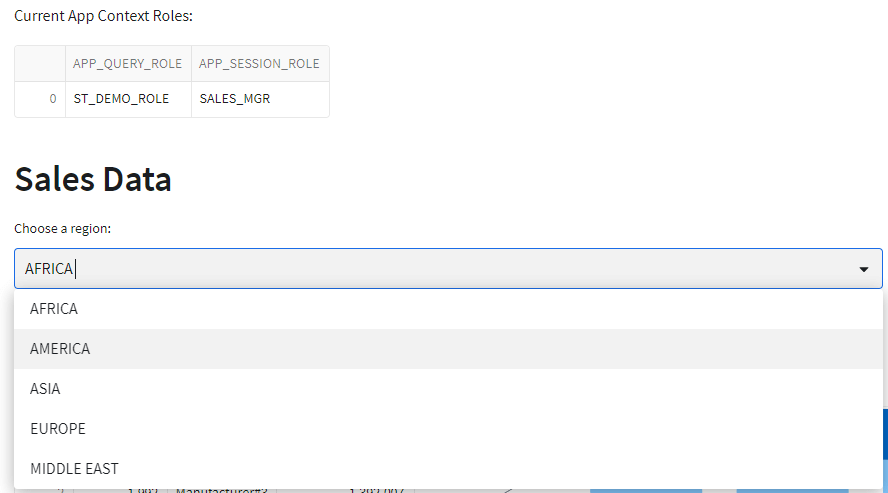
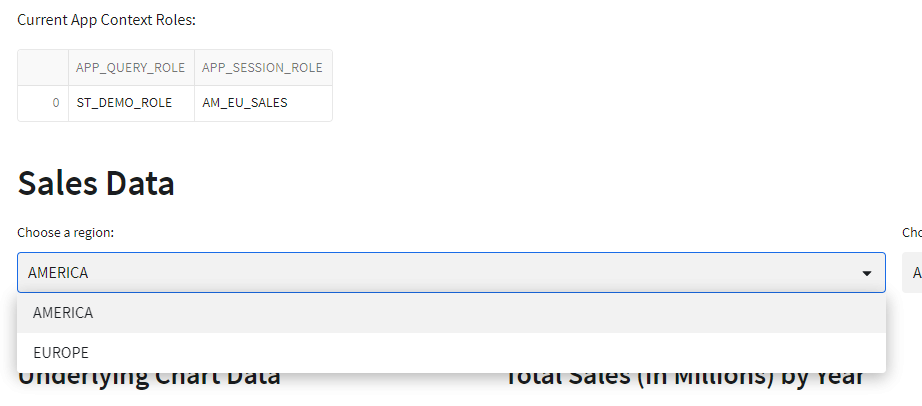
With the schemas in place and the app updated to use the new procedure, the final step is to run the app as different user roles and verify that the row access policy is enforced as expected. The role context code added at the start of this demo will help illustrate the app using the same app role in all scenarios, but a different session role.

Conclusion
The solution in this article presented some of the challenges associated with enforcing role-based row access policies in a native Streamlit app in Snowflake. Currently, this is quite a complex implementation; however, there seems to be potential for improvements in future releases.
This solution required realignment of role hierarchies, creation of role-specific schemas and procedures, and updates to the app to leverage the new objects.
Despite the complexity involved, this approach adds a layer of flexibility to native Streamlit apps requiring role-based access control in Snowflake.
Code Repository
The code shown in this article, along with other demo code for Snowflake and Streamlit is available on my GitHub Repository: Snowflake_Demos
 Eric Heilman