
Recently, I found myself wrestling with a Streamlit app in Snowflake, tasked with presenting large datasets for user review. However, loading these hefty datasets into a data frame proved sluggish and error-prone, especially with over 400,000 records at play. I stumbled upon a Medium article by Carlos Serrano. He detailed the pagination of Streamlit data frames, sparking an idea: could I adapt his methods to my Snowflake app? The answer was a resounding YES!
The Journey Begins
In this article, I’ll walk you through how I breathed new life into my Snowflake app, adding pagination to clunky datasets. But first, let’s rewind a bit. Remember that NOAA Weather Stations app I tinkered with in a previous article? Well, we’re about to give it a serious upgrade.
Data Loader Function
The first order of business was restructuring my code to accommodate pagination. I added a data loader function to fetch map data efficiently, sprucing up the SQL query with additional fields like station names and distances in miles. To use a single data frame for both the map and table, LAT and LONG must be the first two columns in the data frame. Otherwise, the st.map function will return an error.
##DATA LOADER
@st.cache_data(show_spinner=False)
def map_data_loader(lat_off,long_off,rad):

    #GET THE NOAA WEATHER STATIONS WITHIN THE RADIUS SPECIFIED
    station_sql = """
    SELECT LONGITUDE,LATITUDE,
    ID AS STATION_ID,
    ST_DISTANCE(ST_MAKEPOINT(LONGITUDE,LATITUDE),ST_MAKEPOINT({long},{lat}))/1609::NUMBER(8,2) AS DISTANCE_IN_MILES
    FROM ST_DEMO_DB.RAW_DATA.NOAA_STATIONS
    WHERE ST_DWITHIN(ST_MAKEPOINT(LONGITUDE,LATITUDE),ST_MAKEPOINT({long},{lat}),{rad}*1609)
    ORDER BY DISTANCE_IN_MILES
    """

    #FORMAT THE QUERY AND RETURN DATA FRAME AS PANDAS
    df_map = session.sql(station_sql.format(long=long_off,lat=lat_off,rad=radius)).to_pandas()

    return df_map
Data Frame Splitter
Next, add the split_df function and adjust any variable names to fit the app. This function will only be used as part of the display to paginate the results in a data frame.
##DATA SPLITTER
def split_df(input_df,rows):
    df = [input_df.loc[i : i + rows - 1, :] for i in range(0, len(input_df), rows)]
    return df
Transforming the Interface
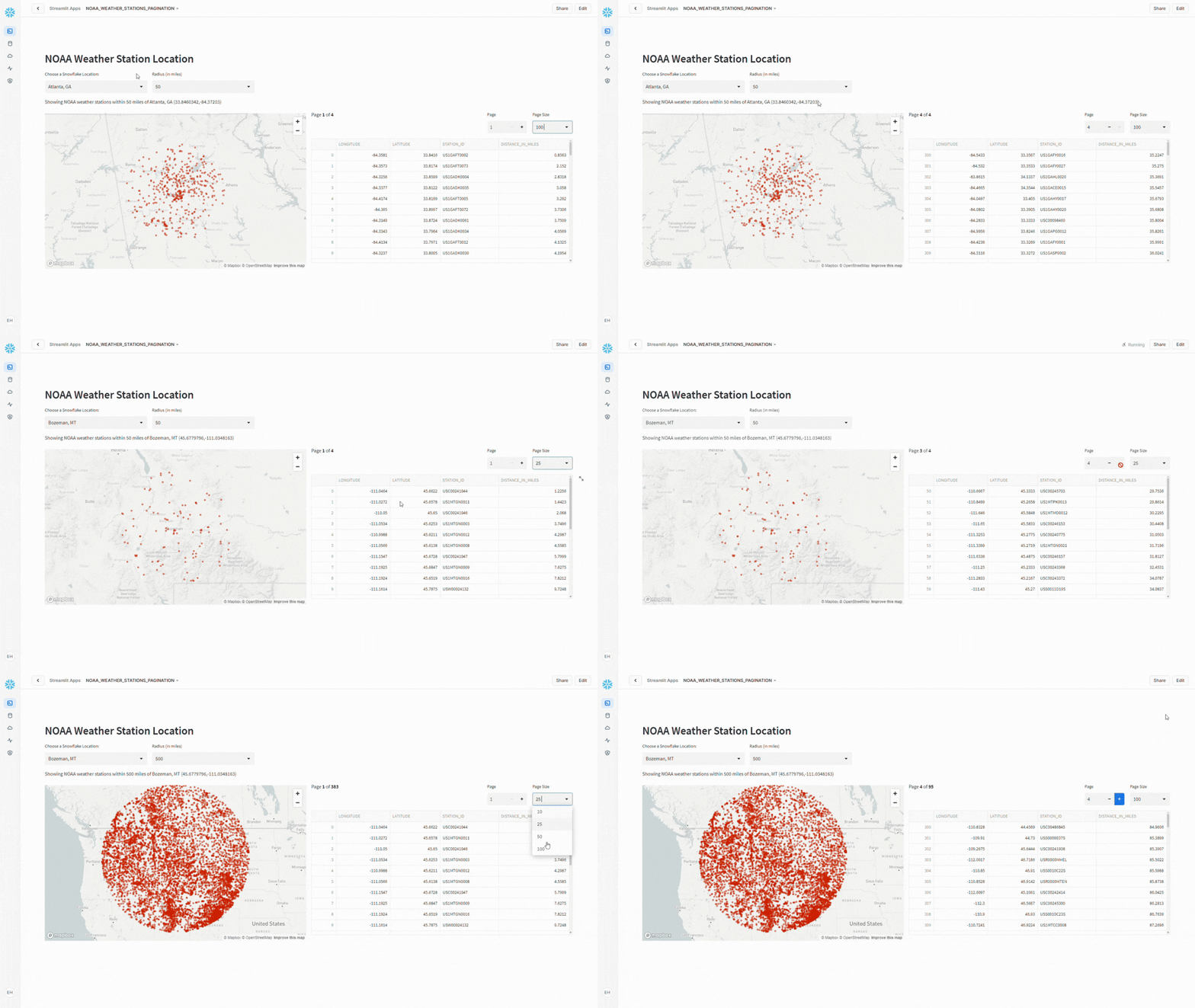
With the groundwork laid, it was time to spruce up the presentation by splitting the interface into two columns – on the left, a dynamic map showcasing weather stations, and on the right, a tidy data frame with pagination controls.
app_cols = st.columns(2)

with app_cols[0]:
    #DISPLAY MAP
    st.map(df_map,use_container_width=True)
Pagination Controls
Using st.columns I add the pagination controls as well as the code to handle splitting the resulting data frame into the desired “chunks” for display.
with app_cols[1]:
    #ADD PAGINATION CONTROLS
    pg_menu = st.columns([4,1,1])
    #ADD BATCH SIZE PICKER
    with pg_menu[2]:
        pg_size = st.selectbox("Page Size",options=[10,25,50,100])
    #ADD PAGE PICKER
    with pg_menu[1]:
        total_pages = (
        int(len(df_map) / pg_size) if int(len(df_map) / pg_size) > 0 else 1
        )
        current_page = st.number_input(
            "Page", min_value=1, max_value=total_pages, step=1
        )
    with pg_menu[0]:
        #DISPLAY CURRENT PAGE
        st.markdown(f"Page **{current_page}** of **{total_pages}** ")
    #PAGINATE UNDERLYING DATA
    df_chart = split_df(df_map,pg_size)
    #DISPLAY DATA
    st.dataframe(df_chart[current_page-1],use_container_width=True)
Final App Display

Conclusion
Adding pagination controls to a Streamlit in Snowflake app can be done quite succinctly and adds a nice touch to your app when returning large amounts of data to the screen. Other enhancements to further extend the pagination controls could include dynamic page size options based on the output – or dynamic filters – or even sorting controls like in the original article which I did not include in this example.
Streamlit continues to impress as a rapid development tool and the ability to run natively in Snowflake has shorted that development cycle.
Full application code is available in my Github Repo: Snowflake Demos
 Eric Heilman
One thought on “Enhancing Snowflake Apps with Streamlit Pagination”