
Getting started with AI can be daunting. I’m just getting started on my AI “tinkering” and finding a good jumping-off point has been difficult. Snowflake has helped make getting started with AI easier through the release of Snowflake Cortex into Public Preview. Cortex is a great starting point for me as it is woven into the Snowflake ecosystem I’m already familiar with, so the learning curve is more palatable.
What is Snowflake Cortex?
Snowflake Cortex is a managed service that adds AI and ML functions to the Snowflake Platform. With SQL and Python functions, developers can access large language models (LLM) for translation, summarization, and even querying large blocks of text. The ML SQL functions assist with the predictive analysis of your data.
At present, Cortex is only available in certain regions and cloud providers.
Getting Started
If your Snowflake account is in a supported region, your account admin must grant the proper Cortex database role to your appropriate role. In the code sample below, I applied the role to my ST_DEMO_ROLE so that my Streamlit app can access the functions. More information is available in the Cortex documentation.
/*GRANT STREAMLIT APP ROLE RIGHT TO CORTEX -- MUST BE DONE BY ACCOUNTADMIN*/
USE ROLE ACCOUNTADMIN;
USE DATABASE SNOWFLAKE;
GRANT DATABASE ROLE CORTEX_USER to ROLE ST_DEMO_ROLE;
Translate
Snowflake Cortex can easily translate text data from one language to another in just a few keystrokes. The translate function supports eleven (11) different languages currently. Let’s take a peek at how we can quickly translate “Hello! How are you?” from English to German.
/*CHANGE ROLE/DB/WAREHOUSE AND TEST*/
USE ROLE ST_DEMO_ROLE;
USE WAREHOUSE STREAMLIT_XS_WH;
USE DATABASE STREAMLIT_DB;
USE SCHEMA STREAMLIT_DATA;

/*TRANSLATE "HELLO! HOW ARE YOU?" TO GERMAN*/
SET ENGLISH = 'Hello! How are you?';
SELECT $ENGLISH as ENGLISH,
    SNOWFLAKE.CORTEX.TRANSLATE($ENGLISH,'en','de') AS GERMAN;

Complete
Using the complete function, you can use an LLM to generate a response to a given prompt. Perhaps you want to know why the sky is blue or extract some insight from the text. The complete function can do just that by using a prompt that can contain multiple requests and return the data in a specified format if you like (i.e. JSON) for further analysis.
Let’s see how we can use the complete function to answer the question “Why is the sky blue?”, but with a twist – how would I explain this to my 8-year-old niece or nephew?
/*WHY IS THE SKY BLUE FOR AN 8 YR OLD*/
SELECT SNOWFLAKE.CORTEX.COMPLETE(
    'llama2-70b-chat'
    ,'Why is the sky blue? Return only one answer suitable for an 8-year old child.'
    );

Summarize
TL;DR – ever gotten an email, landed on a website with a wall of text, or even gotten a dataset with call or chat transcripts? The summarize function in Snowflake Cortex accepts an input of a large (or small) block of text and provides a summary.
To show how this works, I copied the full content of a recent blog article into a table in Snowflake and then used the summary function to summarize it.
Streamlit in Snowflake App
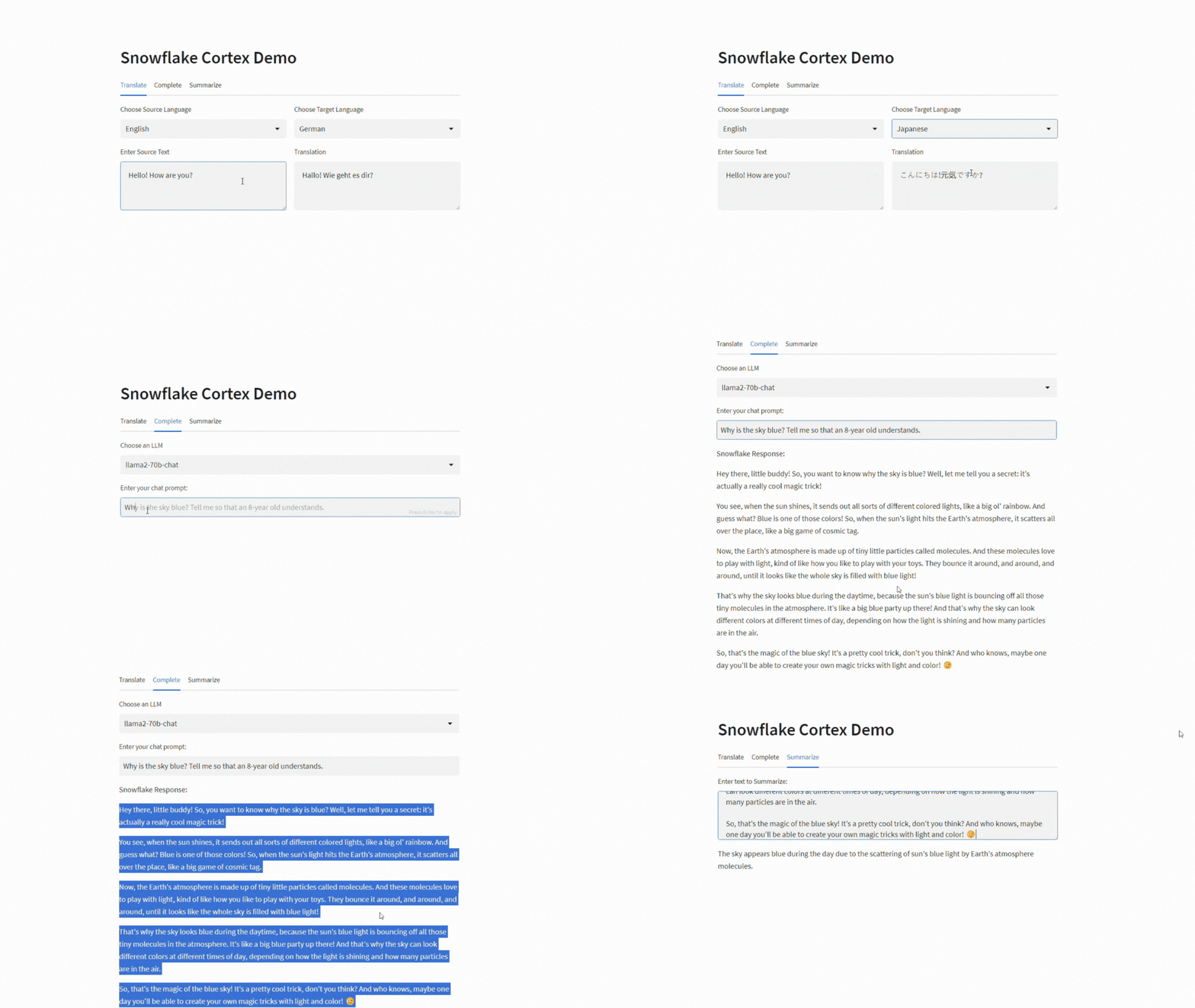
Now, let’s put Cortex to work in a simple Streamlit in Snowflake app that can translate text, provides a space to prompt an LLM and can summarize a block of text. The full sample code, available on my Github repository, will also work as a stand-alone Streamlit app by entering your account details in the creds dictionary section. I’ve cut down the code sample below to improve readability.
#CREATE LANGUAGE DICT
lang_code = {"English":"en","French":"fr","German":"de","Italian":"it",
             "Japanese":"ja","Korean":"ko","Polish":"pl",
             "Portuguese":"pt","Russian":"ru","Spanish":"es",
             "Swedish":"sv"
            }

#CREATE LLM OPTIONS
llm_models = ["llama2-70b-chat","mistral-large","mixtral-8x7b",
              "mistral-7b","gemma-7b"]

#CORTEX TRANSLATE FUNCTION
def cortex_translate(src_text,src_lang,tgt_lang):
    src_text = src_text.replace("'","\\'")
    src_lang_cd = lang_code[src_lang]
    tgt_lang_cd = lang_code[tgt_lang]
    trans_sql = f"""
    SELECT SNOWFLAKE.CORTEX.TRANSLATE('{src_text}','{src_lang_cd}','{tgt_lang_cd}')
    """
    tgt_text = session.sql(trans_sql).collect()[0][0]

    return tgt_text
#CORTEX COMPLETE FUNCTION
def cortex_complete(model_name,prompt):
    prompt = prompt.replace("'","\\'")
    comp_sql = f"""
    SELECT SNOWFLAKE.CORTEX.COMPLETE('{model_name}','{prompt}')
    """
    comp_text = session.sql(comp_sql).collect()[0][0]

    return comp_text
#CORTEXT SUMMARIZE FUNCTION
def cortex_summarize(text):
    text = text.replace("'","\\'")
    summ_sql = f"""
    SELECT SNOWFLAKE.CORTEX.SUMMARIZE('{text}') LIMIT 1
    """
    summ_txt = session.sql(summ_sql).collect()[0][0]

    return summ_txt

#START APP
st.header("Snowflake Cortex Demo")

#SET TABS
tbTranslate,tbComplete,tbSummarize = st.tabs(["Translate","Complete","Summarize"])
#BUILD UI
with tbTranslate:
    colLang = st.columns(2)
    with colLang[0]:
        src_lang = st.selectbox(label="Choose Source Language",options=dict(sorted(lang_code.items())))
    with colLang[1]:
        tgt_lang = st.selectbox(label="Choose Target Language",options=dict(sorted(lang_code.items())))
    colTrans = st.columns(2)
    with colTrans[0]:
        src_text = st.text_area(label="Enter Source Text")
    with colTrans[1]:
        tgt_text = cortex_translate(src_text,src_lang,tgt_lang)
        st.text_area(label="Translation",value=tgt_text)

#COMPLETE
with tbComplete:
    llm_name = st.selectbox(label="Choose an LLM",options=llm_models)
    comp_question = st.text_input(label="Enter your chat prompt:")
    if comp_question:
        comp_answer = cortex_complete(llm_name,comp_question)
        st.write("Snowflake Response:")
        st.write(comp_answer)
#SUMMARIZE
with tbSummarize:
    txt_to_summ = st.text_area(label="Enter text to Summarize:")
    if txt_to_summ:
        st.write(cortex_summarize(txt_to_summ))
Conclusion
Snowflake Cortex shortens the learning curve and management headache of getting started with AI and machine learning for developers. In just a few keystrokes we were able to translate text from one language to another, answer the tough questions for our nieces and nephews, and smash it all together into an app – all while never leaving the safety and security of the Snowflake ecosystem.
The title of this article came from the Streamlit app built by this article. I copied the text (minus code samples) into the app to generate a summary, and then used the summary to prompt LLaMA2 to generate a title. I think it did a pretty good job!
The setup SQL and Streamlit source code is available in my Github Repository along with all my other demos and walkthroughs.
 Eric Heilman
3 thoughts on “Simplifying AI and ML: Snowflake Cortex Makes it Easy”