
Customer information has long been a challenging data set to wrangle, especially with identity resolution and record matching. My team is often engaged to assist our clients in this area of customer data integration (CDI) or entity resolution. Are “Bob Smith” and “Robert Smith” the same person? Possibly.
There are several methods and tools in the market to assist with identifying similar customers and recently Snowflake added the VECTOR data type as well as LLM functions as part of the CORTEX suite to help “vectorize” text. Snowflake also has a function to support Jaro-Winkler similarity to compare two strings.
Common use cases in application and data development include identifying records that are already present in an application or data table. In this demo, I’ll create a simple Streamlit app and use a combination of Cortex Vector and Jaro-Winkler functions to generate a “score” of how similar an input string is to an existing customer name in a customer table. Note: this is not a production-grade solution, it is for demonstration purposes only. The “score” I use is just a method to pick a match. In a production system, this scoring method would likely include other data points and ranking/scoring functions.
Prerequisites
Before starting, there are several initial setup items needed for Snowflake as well as Streamlit. The initial Snowflake steps to enable Cortex are covered in one of my prior demos. For Steamlit, you’ll need a Python Dev Environment with the Streamlit and Snowpark libraries installed.
Customer Data Sample
In keeping with the AI/LLM theme of this post, I used Snowflake Cortex’s COMPLETE function and the Snowflake Arctic model to generate a Snowflake SQL statement to create a simple CUSTOMER_INFO table and populate it with approximately 25 sample records. Using the prompt below, Snowflake generated a command I copied into my SQL Worksheet and loaded the sample table.
/*CREATE A SAMPLE DATA SET*/
SET MODEL_NAME = 'snowflake-arctic';

SELECT SNOWFLAKE.CORTEX.COMPLETE($MODEL_NAME,'GENERATE A SNOWFLAKE SQL STATEMENT TO CREATE OR REPLACE A TRANSIENT TABLE IN ST_DEMO_DB.RAW_DATA SCHEMA CONTAINING AUTOINCREMENTING CUSTOMER ID called CUST_ID, FIRST NAME, LAST NAME AND FULL NAME WITH DEFAULT VALUE OF CONCAT_WS(\' \',FIRST NAME,LAST NAME). NAME TABLE CUSTOMER_INFO INCLUDE INSERT SCRIPT TO POPULATE 25 SAMPLE RECORDS. WRITE THE SQL STATEMENTS ONLY, NO EXPLANATIONS AND FORMATTED TO RUN NATIVELY IN SNOWSIGHT. EXCLUDE ANY FOMATTING CODE');

/*OUTPUT FROM CORTEX*/
-- Create or replace transient table in ST_DEMO_DB.RAW_DATA schema
CREATE OR REPLACE TRANSIENT TABLE ST_DEMO_DB.RAW_DATA.CUSTOMER_INFO (
  CUST_ID INT AUTOINCREMENT,
  FIRST_NAME STRING,
  LAST_NAME STRING,
  FULL_NAME STRING DEFAULT CONCAT_WS(' ', FIRST_NAME, LAST_NAME)
);

-- Insert script to populate 25 sample records
INSERT INTO ST_DEMO_DB.RAW_DATA.CUSTOMER_INFO (FIRST_NAME, LAST_NAME)
VALUES
('John', 'Doe'),
('Jane', 'Doe'),
('Alice', 'Smith'),
('Bob', 'Smith'),
('Charlie', 'Johnson'),
('David', 'Johnson'),
('Evelyn', 'Brown'),
('Frank', 'Brown'),
('Grace', 'Davis'),
('Henry', 'Davis'),
('Isabella', 'Miller'),
('Jack', 'Miller'),
('Kate', 'Wilson'),
('Larry', 'Wilson'),
('Mary', 'Taylor'),
('Nathan', 'Taylor'),
('Olivia', 'Anderson'),
('Peter', 'Anderson'),
('Quinn', 'Thomas'),
('Rachel', 'Thomas'),
('Sophia', 'Jackson'),
('Thomas', 'Jackson'),
('Victoria', 'White'),
('William', 'White'),
('Xavier', 'Harris'),
('Yvonne', 'Harris'),
('Zoe', 'Martin');
Scoring Matches with SQL
For this example, I’ll use three functions to score how closely an input string matches a known string, and then take the average of the three to determine an overall score for the match. This method is by no means perfect or anything I’ve run across in my experience; however, it does show the differences in the scoring methods and even the different scores from each model.
Vectorizing Text
Using the new EMBED_TEXT_768 function of Snowflake Cortex, I can convert my test string as well as the strings in the customer data table into vectors. The function outputs vector value as a VECTOR(FLOAT,768) data type.
SELECT SNOWFLAKE.CORTEX.EMBED_TEXT_768('snowflake-arctic-embed-m','ERIC')
Score 1: VECTOR_COSINE_SIMILARITY
Once the strings are converted to vectors, using the function VECTOR_COSINE_SIMILARITY I can generate a score from 0 to 1 that can be used to determine how similar the vectors are. Scores closer to 1.0 indicate “more similar”.
SET VECT_MDL_NM = 'snowflake-arctic-embed-m';
SET NEW_CUST = 'Petey Andersen';

SELECT
VECTOR_COSINE_SIMILARITY(
        SNOWFLAKE.CORTEX.EMBED_TEXT_768($VECT_MDL_NM,CI.FULL_NAME)
        ,SNOWFLAKE.CORTEX.EMBED_TEXT_768($VECT_MDL_NM,$NEW_CUST)
        )
FROM CUSTOMER_INFO AS CI;

Score 2: VECTOR_L2_DISTANCE
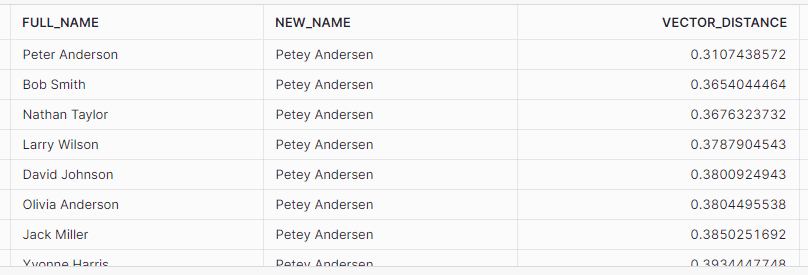
Again, after converting my source and target strings to vectors using Cortex, I can create a distance score using VECTOR_L2_DISTANCE. This function also generates a score from 0 to 1 indicating “how far apart” the two vectors are. In this case, scores closer to 0 indicate that the vectors are closer together.
SET VECT_MDL_NM = 'snowflake-arctic-embed-m';
SET NEW_CUST = 'Petey Andersen';

SELECT
VECTOR_L2_DISTANCE(
        SNOWFLAKE.CORTEX.EMBED_TEXT_768($VECT_MDL_NM,CI.FULL_NAME)
        ,SNOWFLAKE.CORTEX.EMBED_TEXT_768($VECT_MDL_NM,$NEW_CUST)
        )
FROM CUSTOMER_INFO AS CI;
Score 3: JAROWINKLER_SIMILARITY
Using the JAROWINKLER_SIMILARITY function on the native strings, I can generate a score from 0 to 100 as to how similar the strings are without vectorizing them first. For this score, closer to 100 indicates the strings are more similar.
SET NEW_CUST = 'Petey Andersen';

SELECT
JAROWINKLER_SIMILARITY(CI.FULL_NAME,$NEW_CUST)
FROM CUSTOMER_INFO AS CI;

Combo Score:
To generate a single score, I’ll average the VECTOR_COSINE_SIMILARITY score, the JAROWINKLER score (converted to a percentage), and 1 minus the VECTOR_L2_DISTANCE score. Again, this is not anything I’ve used in production, it just gives a single score by equally weighting the scores used for comparison.
Final Snowflake Query
Putting all the scores together into a single query and adding in the variables that will be part of Streamlit, I can change the inputs to validate the data output to be sure the app is returning the same data. I’ll also go ahead and add the proper column aliases for the app as well.
SET VECT_MDL_NM = 'snowflake-arctic-embed-m';
SET NEW_CUST = 'Petey Andersen';
SET TTL_SCORE = .50;
SET MAX_MATCH = 5;
SELECT
    $NEW_CUST AS "NEW CUSTOMER NAME",
    CI.FULL_NAME AS "EXISTING CUSTOMER NAME",
    VECTOR_COSINE_SIMILARITY(
        SNOWFLAKE.CORTEX.EMBED_TEXT_768($VECT_MDL_NM,CI.FULL_NAME)
        ,SNOWFLAKE.CORTEX.EMBED_TEXT_768($VECT_MDL_NM,$NEW_CUST)
        ) as "VECTOR SIMILARITY SCORE"
    ,VECTOR_L2_DISTANCE(
        SNOWFLAKE.CORTEX.EMBED_TEXT_768($VECT_MDL_NM,CI.FULL_NAME)
        ,SNOWFLAKE.CORTEX.EMBED_TEXT_768($VECT_MDL_NM,$NEW_CUST)
        ) AS "VECTOR DISTANCE SCORE"
    ,JAROWINKLER_SIMILARITY(CI.FULL_NAME,$NEW_CUST)/100.0 AS "JAROWINKLER SIMILARITY SCORE"
    ,("VECTOR SIMILARITY SCORE" + (1-"VECTOR DISTANCE SCORE") + "JAROWINKLER SIMILARITY SCORE") / 3 AS "CALCULATED SUMMARY SCORE"
FROM
    CUSTOMER_INFO as CI
WHERE
    "CALCULATED SUMMARY SCORE" >= $TTL_SCORE
QUALIFY
    RANK() OVER(ORDER BY "CALCULATED SUMMARY SCORE" DESC) <= $MAX_MATCH;
Streamlit App
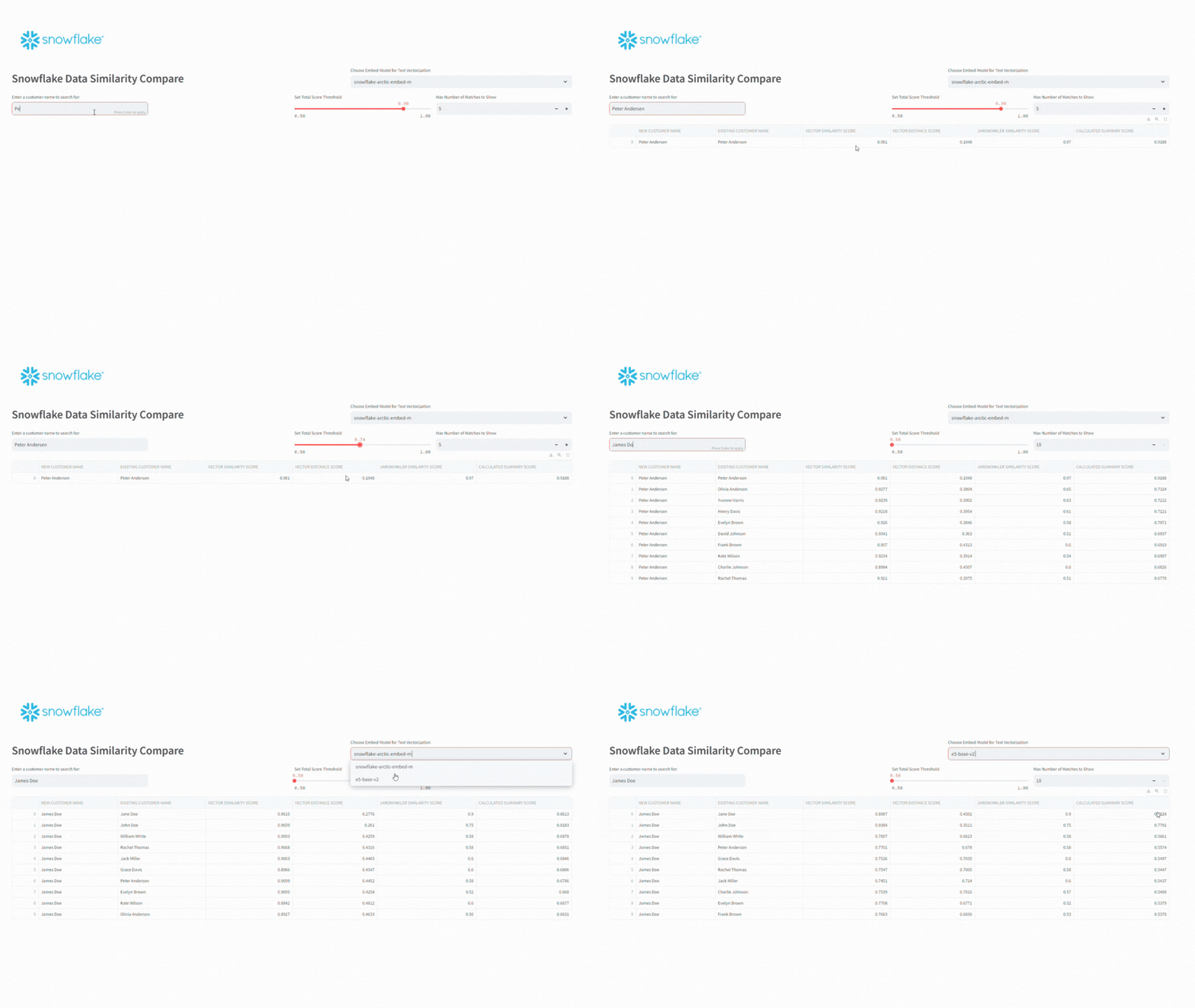
For this app, I’ll add a select box to choose the model for vectorizing the data. Snowflake currently supports two different models – snowflake-arctic-embed-m and e5-base-v2. I’ll also add an input text box for the name to search for, a slider to adjust the acceptable score threshold, and a number chooser for setting the number of matches to display.
#CREATE LLM OPTIONS
llm_models = ["snowflake-arctic-embed-m",
              "e5-base-v2"]

#ADD SNOWFLAKE LOGO, HEADER AND LLM CHOOSER
st.image(image="https://www.snowflake.com/wp-content/themes/snowflake/assets/img/brand-guidelines/logo-sno-blue-example.svg")
colHeader = st.columns([3,2])
with colHeader[0]:
    st.header("Snowflake Data Similarity Compare")
with colHeader[1]:
    curr_model = st.selectbox(label=f"Choose Embed Model for Text Vectorization",options=llm_models)

#BUILD UI
session = sp.Session.builder.configs(creds).create()
colInput = st.columns(4)
with colInput[0]:
    new_cust = st.text_input("Enter a customer name to search for:")
with colInput[2]:
    ttl_score = st.slider("Set Total Score Threshold",min_value=.50, max_value=1.0,value=.90)
with colInput[3]:
    num_results = st.number_input("Max Number of Matches to Show",min_value=1,max_value=10,value=5)
To keep things relatively simple, I’ll Python’s string formatting functions to replace any variable data in the SQL command for Snowflake.
if new_cust:
    new_cust = "\'" + new_cust + "\'"
    curr_model = "\'" + curr_model + "\'"
    sql = f'''
SELECT
    {new_cust} AS "NEW CUSTOMER NAME"
    ,CI.FULL_NAME AS "EXISTING CUSTOMER NAME"
    ,VECTOR_COSINE_SIMILARITY(
        SNOWFLAKE.CORTEX.EMBED_TEXT_768({curr_model},CI.FULL_NAME)
        ,SNOWFLAKE.CORTEX.EMBED_TEXT_768({curr_model},{new_cust})
        ) as "VECTOR SIMILARITY SCORE"
    ,VECTOR_L2_DISTANCE(
        SNOWFLAKE.CORTEX.EMBED_TEXT_768({curr_model},CI.FULL_NAME)
        ,SNOWFLAKE.CORTEX.EMBED_TEXT_768({curr_model},{new_cust})
        ) AS "VECTOR DISTANCE SCORE"
    ,JAROWINKLER_SIMILARITY(CI.FULL_NAME,{new_cust})/100.0 AS "JAROWINKLER SIMILARITY SCORE"
    ,("VECTOR SIMILARITY SCORE" + (1-"VECTOR DISTANCE SCORE") + "JAROWINKLER SIMILARITY SCORE") / 3 AS "CALCULATED SUMMARY SCORE"
FROM
    ST_DEMO_DB.RAW_DATA.CUSTOMER_INFO as CI
WHERE
    "CALCULATED SUMMARY SCORE" >= {ttl_score}
QUALIFY
    RANK() OVER(ORDER BY "CALCULATED SUMMARY SCORE" DESC) <= {num_results}
'''

    df = session.sql(sql)
    st.dataframe(df,use_container_width=True)
Running the app and changing the inputs, I can search my existing customer table and then set score thresholds to see how the results change.
Conclusion
In this demo, I used Snowflake Cortex to generate an SQL command to load a table with demo data and vectorize text for comparisons. From there I created a simple scoring query and used Streamlit as an application interface for searching for existing customers.
The vector functions show promise in identifying similar text; however, the scoring thresholds will certainly need a lot of monitoring and tuning to ensure proper matching; especially if accuracy is key in cases such as customer identification.
The full set of SQL scripts and the Streamlit app code are available on my GitHub Repo.
Follow me on LinkedIn and Medium for more content on Data Management and demos including Snowflake, Streamlit, and SQL Server.
 Eric Heilman