
In a previous article, I described how to use Snowflake’s SQL to set up a dynamic pivot query without using any dynamic SQL. In this post, we’ll take that a step further and build a quick Streamlit in Snowflake app that will allow configuration of parts of the query and display the results in a data frame.
Getting Started
First, if not already done, create a new database that will hold your app and a view to simplifying the build process. In my case, I created ST_DEMO_DB and will use the PUBLIC schema.
Convert CTE to a View
In the prior demo, I used a Common Table Expression (CTE) as the base of the pivot query. In the Streamlit app, I’d like to use some of the data from that base data to build a select box to choose the region to display. To simplify my queries, I’ll first convert the CTE to a view.
CREATE OR REPLACE VIEW ST_DEMO_DB.PUBLIC.VW_NATION_SALES
    (C_ACCTBAL, C_MKTSEGMENT, N_NAME, R_NAME)
AS
SELECT
    C_ACCTBAL,
    C_MKTSEGMENT,
    N.N_NAME,
    R.R_NAME
FROM
    SNOWFLAKE_SAMPLE_DATA.TPCH_SF1.CUSTOMER AS C
    JOIN SNOWFLAKE_SAMPLE_DATA.TPCH_SF1.NATION AS N ON C.C_NATIONKEY = N.N_NATIONKEY
    JOIN SNOWFLAKE_SAMPLE_DATA.TPCH_SF1.REGION AS R ON N.N_REGIONKEY = R.R_REGIONKEY;
Creating the App
Now that the view is in place, I’ll create a new Streamlit app. Normally, I create Streamlit apps manually through SQL; however, part of the purpose of this demo is to show how all of this can be done directly in Snowsight, so I’ll do so by navigating to Projects -> Streamlit and clicking “+ Streamlit App”. Give your app a meaningful name such as “Dynamic Pivot” and choose the appropriate database, schema, and virtual warehouse. The app will be created with demo code, we’ll remove most of it to add our own.

Adding Pivot Criteria
First, we’ll create three (3) select boxes that will be the inputs to our dynamic pivot query. I’ll also use Streamlit’s column widget to help space them nicely on the page. Select boxes will be created for:
- Region
- Aggregate
- Pivot Column
The region select box values will come from the view, and the aggregate and pivot columns values will be entered as static values. Each chosen select box value will be stored in variables used in the next step.
#Set Columns to hold three select boxes
colRegion,colAgg,colPivot = st.columns(3)
#Load Region Select Box
with colRegion:
    # Build selection for dynamic filter
    sql_region = """
    SELECT R_NAME FROM
    ST_DEMO_DB.PUBLIC.VW_NATION_SALES
    GROUP BY R_NAME
    ORDER BY R_NAME ASC
    """
    df_region = session.sql(sql_region)
    df_region.sort("R_NAME")
    region = st.selectbox(label="Choose a region",options = df_region)
#Load aggregate function selection box
with colAgg:
    agg = st.selectbox(label="Choose an aggregate",options=["AVG","COUNT","MAX","MIN","SUM"])

with colPivot:
    pivot = st.selectbox(label="Choose pivot column",options=["N_NAME","C_MKTSEGMENT"])

Dynamic Pivot Data Frame
Next, we’ll add our dynamic pivot query. First, we’ll grab the query from the last post and replace the CTE with our view earlier. Next, we’ll add placeholders for each of the values set in the select boxes. With the SQL command ready, we’ll execute and store the output into a Pandas data frame and run a “rename” command to replace the single quotes in our column names resulting from the PIVOT command in Snowflake SQL. Lastly, display the data using a Streamlit data frame, hiding the index column for readability.
# Use the region to pivot the country names
sql_pivot = f"""
SELECT
    *
FROM
    (SELECT N_NAME,C_ACCTBAL,C_MKTSEGMENT
    FROM ST_DEMO_DB.PUBLIC.VW_NATION_SALES
    WHERE R_NAME = '{region}') AS N
PIVOT(
    {agg}(C_ACCTBAL) FOR {pivot} IN (SELECT {pivot}
                                    FROM ST_DEMO_DB.PUBLIC.VW_NATION_SALES
                                    WHERE R_NAME = '{region}'
                                    GROUP BY {pivot})
)
ORDER BY 1
"""

df_pivot = session.sql(sql_pivot).to_pandas()
#Convert to pandas to replace single quotes in column names
#df_pivot = df_pivot.to_pandas()
df_pivot.columns = [c.replace("'","") for c in list(df_pivot.columns)]
st.dataframe(data=df_pivot,use_container_width=True,hide_index=True)
Wrapping Up
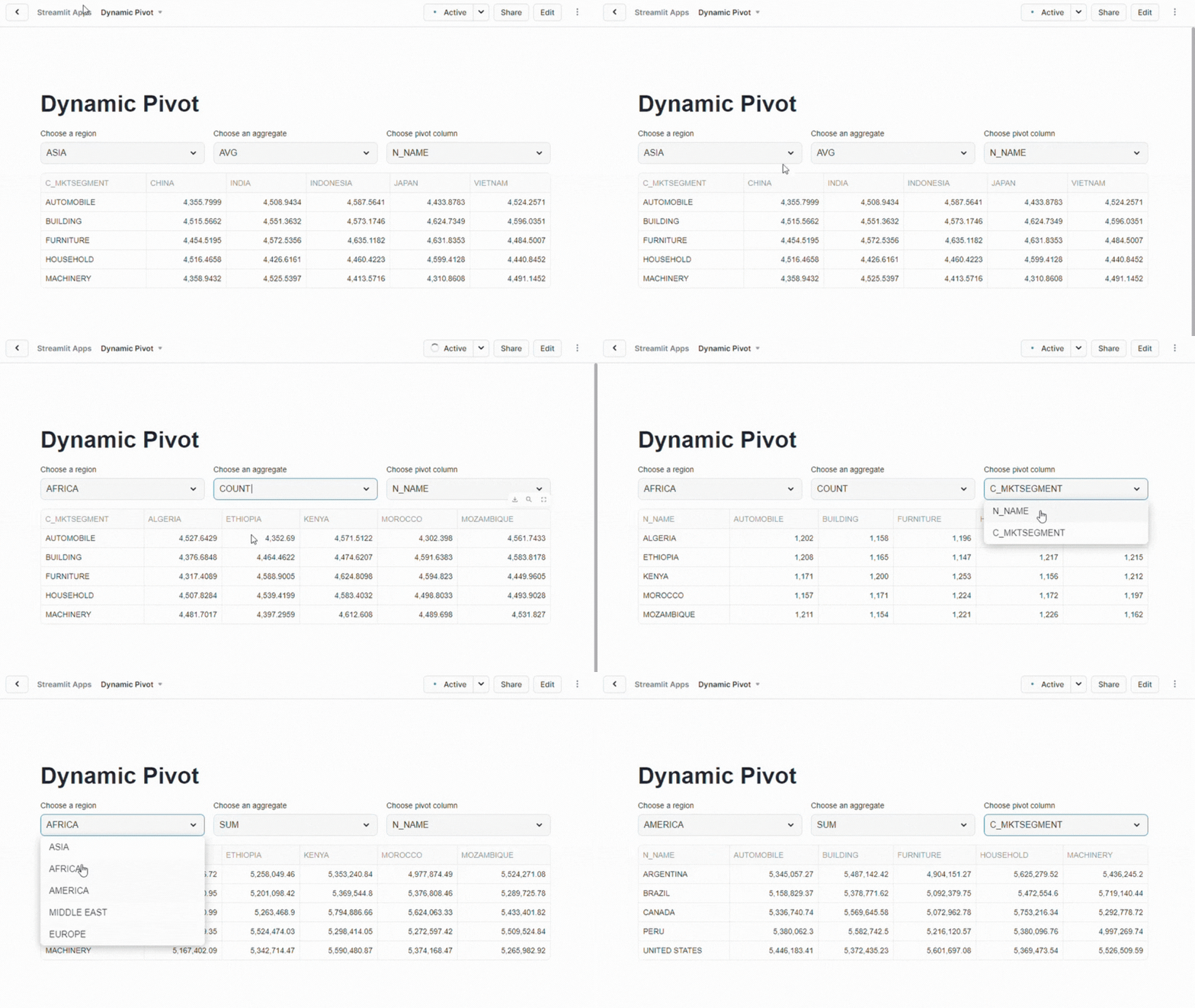
Now when you run the app in Snowflake you can change the values in the select boxes and see how the data changes almost instantly running different versions of the query. One more little fun piece to add is outputting the SQL command below the data frame so you can see what’s running “under the covers”. You can add that with Streamlit’s code widget.
st.code(sql_pivot)

Conclusion
In this article, we expanded on creating a dynamic pivot in Snowflake by building a Streamlit app to allow easy configuration of query parameters and immediately display the results in a data frame. Key steps were converting the base CTE to a view, creating select boxes for dynamic input, and executing a modified query in Streamlit. The finished app enables quick query adjustments and displays the data neatly.
Follow me on LinkedIn and Medium for more content on Data Management and demos including Snowflake, Streamlit, and SQL Server.
 Eric Heilman