Snowflake: Procedure Default Parameter Values

A few weeks ago, I wrote about polymorphism in Snowflake as a way to “get around” the issue with Snowflake procedures not allowing default parameter values. As the Snowflake platform evolves, more features are constantly being added – today I discovered that default parameter values are supported in procedures!

Prior Example Review

In the previous example, I provided a stored procedure that writes to an event log table in Snowflake with two input parameters and a second version of the procedure that used polymorphism to only use one parameter. The original code is below:

/*CREATE PROC*/

CREATE OR REPLACE PROCEDURE USP_EVT_LOG(EVT_TYPE VARCHAR(10),EVT_DESC VARCHAR(1000))
RETURNS BOOLEAN
AS
BEGIN
    INSERT INTO TBL_EVT_LOG(EVT_TYPE,EVT_DESC)
    VALUES(COALESCE(:EVT_TYPE,'INFO'),:EVT_DESC);
    RETURN TRUE;
END;

/*CREATE ALTERNATE SIGNATURE*/
CREATE OR REPLACE PROCEDURE USP_EVT_LOG(EVT_DESC VARCHAR(1000))
RETURNS BOOLEAN
AS
DECLARE
    RETURN_VALUE BOOLEAN DEFAULT FALSE;
BEGIN
    RETURN_VALUE := (CALL USP_EVT_LOG('INFO',:EVT_DESC));
    RETURN RETURN_VALUE;
END;

Using Default Parameters

Now that Snowflake can utilize default parameters for stored procedures, I can re-write the procedure to set the EVT_TYPE parameter default to NULL, or any other value, if not specified in the procedure call.

Parameter Order

One difference from SQL Server is that the parameter order matters in Snowflake when using defaults in the procedure definition. Required parameters must appear in the signature before any optional parameters. For example, if I leave the parameters in the same order as before, but set EVT_TYPE to have a default, Snowflake will throw an error.

CREATE OR REPLACE PROCEDURE ST_DEMO_DB.RAW_DATA.USP_EVT_LOG("EVT_TYPE" VARCHAR(10) DEFAULT NULL, "EVT_DESC" VARCHAR(1000))
RETURNS BOOLEAN
LANGUAGE SQL
EXECUTE AS OWNER
AS
$$
BEGIN
    INSERT INTO TBL_EVT_LOG(EVT_TYPE,EVT_DESC)
    VALUES(COALESCE(:EVT_TYPE,'INFO'),:EVT_DESC);
    RETURN TRUE;
END
$$;
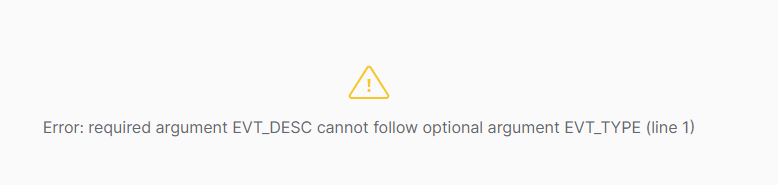
Error with OPTIONAL argument after a required argument

Since I want the EVT_TYPE to be optional, I’ll have to swap the order of the input parameters in the signature to ensure the desired functionality.

CREATE OR REPLACE PROCEDURE ST_DEMO_DB.RAW_DATA.USP_EVT_LOG("EVT_DESC" VARCHAR(1000),"EVT_TYPE" VARCHAR(10) DEFAULT NULL)
RETURNS BOOLEAN
LANGUAGE SQL
EXECUTE AS OWNER
AS
$$
BEGIN
    INSERT INTO TBL_EVT_LOG(EVT_TYPE,EVT_DESC)
    VALUES(COALESCE(:EVT_TYPE,'INFO'),:EVT_DESC);
    RETURN TRUE;
END
$$;
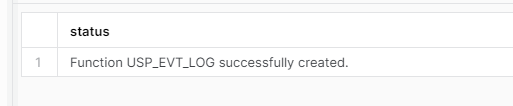
Procedure created successfully

Executing the Procedure

With the parameter set to have a default value now, there are several ways to appropriately call the procedure to get the desired function. Each of the following options will properly call the USP_EVT_LOG procedure and write a record to TBL_EVT_LOG:

/*ONLY PASS REQUIRED STRING*/
CALL USP_EVT_LOG('Sample event log;unnamed parameters');

/*PASS REQUIRED STRING BY NAME*/
CALL USP_EVT_LOG(EVT_DESC =>'Sample event log;named parameters');

/*PASS VALUES FOR BOTH PARAMETERS*/
CALL USP_EVT_LOG(EVT_DESC =>'Sample event lot;named parameters including value for optional',EVT_TYPE=> 'INFO');

/*PARAMETER ORDER DOES NOT MATTER IF BOTH SPECIFIED BY NAME*/
CALL USP_EVT_LOG(EVT_TYPE=> 'INFO',EVT_DESC =>'Sample event lot;named parameters including value for optional;params in opposite order');
Results from procedure calls in TBL_EVT_LOG

Conclusion

Adding the ability to set default parameter values for procedures reduces the need for the overuse of polymorphism with multiple signatures just to account for default parameter values. Polymorphism is still supported in Snowflake and still has a place in design practices.


Kudos to Snowflake for adding this feature!

SQL Server: “New” String Functions

String manipulation in T-SQL code is not a new concept. I intentionally used “new” to indicate that some of the string functions discussed in this article were added after SQL Server 2016, which was the version I was using until a recent upgrade. Microsoft is constantly adding new features to SQL Server, many times it is to add features already available in other platforms. Here are a few string functions that were added after SQL Server 2016 that I’ve used recently that simplified a lot of my code. All examples will reference the sample HR data from my recent post on SQL Server Greatest and Least Functions.

  1. CONCAT_WS
    1. Sample Use Case
  2. STRING_AGG
    1. Sample Use Case
  3. STRING_SPLIT
    1. Sample Use Case
  4. Wrapping Up

CONCAT_WS

CONCAT_WS is useful for concatenating, or joining, strings with a separator (WS). Use cases could include building a delimited list across several columns or from multiple variables, building a fully qualified database object name from the parts, or any number of things where you need to build a list. CONCAT_WS input values are the separator in the first parameter, followed by N-values that will be concatenated.

Using the sample HR data, we can generate output of employee names and departments in LAST NAME,FIRST NAME,DEPARTMENT NAME format.

SELECT
	e.emp_id,
	CONCAT_WS(',',e.lname,e.fname,d.dept_name) AS emp_info	
FROM
	#tbl_employees AS e
JOIN
	#tbl_emp_dept AS ed
ON
	e.emp_id = ed.emp_id
JOIN
	#tbl_departments AS d
ON
	d.dept_id = ed.dept_id
CONCAT_WS output

Sample Use Case

A recent use case for CONCAT_WS in a project was to combine a set of columns into a single string, and then use HASHBYTES to generate a hashed value for the data as a quick comparison method for data changes. Before CONCAT_WS, I was using CROSS APPLY with FOR XML RAW to accomplish this. Below are samples of both methods – CONCAT_WS makes things much easier to read. The output from HASHBYTES is different due to the different inputs; however, the actual hash value doesn’t matter if using the same hash method and inputs on source and target as in my case we don’t store the hash value, it’s generated at run-time.

SELECT
	e.emp_id,
	h.x AS hash_input,
	HASHBYTES('MD5',h.x) AS emp_name_hash
FROM 
	#tbl_employees AS e
CROSS APPLY(
	SELECT
		e.lname,
		e.fname
	FOR XML RAW) AS h(x)


/*USING CONCAT_WS*/
SELECT
	e.emp_id,
	CONCAT_WS('%',e.lname,e.fname) AS hash_input,
	HASHBYTES('MD5',CONCAT_WS('%',e.lname,e.fname)) AS emp_name_hash
FROM
	#tbl_employees AS e
SQL Output

STRING_AGG

STRING_AGG does for rows of data what CONCAT_WS does for columns. STRING_AGG combines the values from a single column of data and generates a delimited list of the values. Before STRING_AGG, I used methods such as += with a variable or different variations of the STUFF function with CROSS APPLY and FOR XML. STRING_AGG certainly simplified these methods. Notice in the code sample below that the output is the same, but the STRING_AGG code is one line versus several lines with nested functions and conversions.

/*CROSS APPLY WITH FOR XML PATH AND STUFF*/
DECLARE @emp_id_list VARCHAR(100)
SELECT
    @emp_id_list =
(
    SELECT
        STUFF((
                  SELECT '|' + CONVERT(VARCHAR,emp_id) FROM #tbl_employees FOR XML PATH('')
              )
             ,1
             ,1
             ,''
             )
);
SELECT @emp_id_list AS employee_ids

/*STRING AGG*/
SELECT STRING_AGG(emp_id,'|') AS employee_ids FROM #tbl_employees;
Pipe-delimited list of employee_ids

Sample Use Case

In a recent project, I used STRING_AGG to generate a delimited list of all possible ID values in a table as part of an application stored procedure. One of the stored procedure input parameters is a pipe-delimited list of ID values to return; however, it could also be set to NULL by default to return all values. By combining STRING_AGG with STRING_SPLIT I was able to accomplish applying this “dynamic filter” easily.

/*VARIABLE DECLARATION*/
DECLARE
	@input_param VARCHAR(50) = '1|6' /*INPUT VALUE SPECIFIED*/
	,@all_emp_ids VARCHAR(50) = NULL

/*GET LIST OF ALL EMPLOYEE IDS*/
SELECT @all_emp_ids = STRING_AGG(emp_id,'|') FROM #tbl_employees

/*IF INPUT IS NULL, SET INPUT TO ALL*/
SELECT @input_param = COALESCE(@input_param,@all_emp_ids)

/*GET EMPLOYEE DATA*/
SELECT e.* FROM #tbl_employees AS e
JOIN STRING_SPLIT(@input_param,'|') AS l
ON l.value = e.emp_id
Employee Data Filtered
/*VARIABLE DECLARATION*/
DECLARE
	@input_param VARCHAR(50) = NULL /*INPUT IS DEFAULT/NULL*/
	,@all_emp_ids VARCHAR(50) = NULL

/*GET LIST OF ALL EMPLOYEE IDS*/
SELECT @all_emp_ids = STRING_AGG(emp_id,'|') FROM #tbl_employees

/*IF INPUT IS NULL, SET INPUT TO ALL*/
SELECT @input_param = COALESCE(@input_param,@all_emp_ids)

/*GET EMPLOYEE DATA*/
SELECT e.* FROM #tbl_employees AS e
JOIN STRING_SPLIT(@input_param,'|') AS l
ON l.value = e.emp_id
All Employee Data

STRING_SPLIT

STRING_SPLIT was first introduced in SQL Server 2016 and provided functionality that many developers had written custom functions for. I have written several variants of a split function in my career. STRING_SPLIT does exactly what it sounds like – an input string is split using a delimiter character into its parts and returned as a table. In SQL Server 2022, a new optional parameter was added that includes the ordinal value on the output which indicates the value’s relative location in the original string.

Sample Use Case

Sometimes I need to split email addresses into parts (username/domain) for storage or other analysis. String split makes that relatively simple to do. Below are some randomly generated email addresses in a table and using STRING_SPLIT with a CROSS APPLY and the new SQL Server 2022 ordinal option, I can easily retrieve the full email address, username, and domain in a single table.

CREATE TABLE #tbl_email (email_address VARCHAR(250));

INSERT INTO #tbl_email (email_address)
VALUES
('cope-dereck99@hotmail.com      '),
('miner_christopher44@hotmail.com'),
('yang_barrett88@mail.com        '),
('babcock_ingrid5@outlook.com    '),
('vance-fletcher58@mail.com      '),
('alberto_bautista56@yahoo.com   ');

SELECT
    e.*
   ,u.n AS user_name
   ,d.n AS domain_name
FROM
    #tbl_email AS e
CROSS APPLY
(
    SELECT
        value
    FROM
        STRING_SPLIT(e.email_address, '@', 1)
    WHERE
        ordinal = 1
) AS u(n)
CROSS APPLY
(
    SELECT
        value
    FROM
        STRING_SPLIT(e.email_address, '@', 1)
    WHERE
        ordinal = 2
) AS d(n);	
Email Address, Username and Domain output

Wrapping Up

String manipulation in T-SQL is fairly common in practice and SQL Server does a nice job of providing functions to help with common manipulations that many developers wrote custom functions for. The functions discussed in this article significantly simplified many of my stored procedures recently and made the code much more readable. “Future me” will thank “current me” for swapping out all the custom work for simple, easy-to-read functions.

Failure IS An Option

In today’s social media-driven world it is easy to get caught up in the pursuit of perfect. Pursuing the perfect spouse, job, kids, or bank account balance and comparing our version of those things to the “perfect” version that others portray on different platforms completely skews that it is okay to fail. Let that sink in – it is okay to fail.

As a husband, father, team leader, and coach, I see daily instances of comparison to the perceived “perfect” or a fear of failure. I’m not immune to it either. I catch myself doing the comparisons. “I’m not as smart as <insert name here>” or “I don’t earn as much as <another person>.”

I also see instances where the fear of failure is paralyzing. I see it in team members who are afraid to try new solutions to problems. I see it in my children when a project doesn’t turn out exactly as they envisioned and, to them, it’s “ruined” or “terrible.”

Some of my best learning experiences, personally and professionally, started with failure. I failed. I messed up. I didn’t get the job. The code I had worked on for hours didn’t work as expected. Failure made me stronger, more resilient, driven. I’ve had several great teachers and mentors in my life, and failure has been one of them.

Failure as a Leader

Leaders are often seen as “the guy with all the answers.” I certainly don’t have all the answers. I have many that I’ve picked up over the years, but certainly not all the answers for my team. 

Personal failure as a leader reinforces for the team that it is okay to be imperfect; however, how leaders respond to that failure reinforces how the team will react. Teams whose leaders fail but dust themselves off and try again will follow suit. Successful team leaders portray the behaviors they expect from their teams. Show the team that failing is acceptable, but the expectation is that they rethink their approach and charge up the hill again.

Leaders must embrace failure within the team and encourage team members who’ve hit that wall. The leader’s role is to help assess what happened and what new learnings come from it to continue moving forward. A good leader will help the team work through the failure, not blast them for failing. There may be correction or coaching needs resulting from an “oops”, but beating the team down doesn’t help anyone in the long run.

Failure as a Team Member

Some of the best teams I’ve worked with didn’t have a standard of perfect; however, we did have an extremely high standard for our quality, but not perfect. Pursuit of perfection often results in “paralysis by analysis.” We over analyze a situation, attempting to cover every possible outcome to build the perfect widget. The high-functioning teams I’ve been a part of had members who tried different solutions. We missed the mark on many of them; however, each failed attempt was a learning experience.

The best leaders I’ve had allowed their teams the room to try new solutions and support them through a failure. They helped our team mitigate risk associated with a new method by pointing out some boundaries to be aware of or providing a contrarian viewpoint. They allowed space to work and try new things, but they were the first person to help pick us up when we crashed and burned.

Normalizing the Imperfect

It’s okay if things aren’t perfect or don’t measure up to the image protrayed on social media or whatever the comparison “standard” is. As leaders, and team members, we have to normalize the notion that not every attempt results in the perfect widget. But we do have to normalize a culture of learning from those attempts and not making the same mistakes more than once.

A famous quote from Thomas Edison usually comes to mind when discussing learning from mistakes.

“I have not failed. I’ve just found 10,000 ways that won’t work.”

Thomas Edison

I’ve always looked at my failed attempts in this manner. We only completely “fail” when we stop trying. Keep going.
