Snowflake: Greatest and Least Functions

In a recent post, I discussed the GREATEST and LEAST functions in SQL Server 2022. Both of these functions exist in Snowflake, but after some testing, I found that they behave differently in Snowflake than in SQL Server when dealing with NULL values. While the functions behave differently, there are options to “get around” the NULL values in Snowflake and replicate the behavior from SQL Server.

Test Data Setup

In the SQL Server post, I used the RAND function in a CROSS APPLY to generate sample data. Rather than convert all the SQL Server T-SQL to Snowflake SQL to replicate the behavior, I will hard-code the data from SQL Server into appropriate INSERT scripts for Snowflake to the demos look at the same data. I’m using a TRANSIENT table with 0 days of TimeTravel. This ensures this table does not use additional storage for TimeTravel or Fail Safe. Using transient tables instead of temporary tables allows me to come back to my work in the event of a session or connection loss.

DROP TABLE IF EXISTS tbl_employees;

CREATE TRANSIENT TABLE tbl_employees
DATA_RETENTION_TIME_IN_DAYS=0 
(
	emp_id INT IDENTITY(1,1),
	fname VARCHAR(50),
	lname VARCHAR(50),
	hire_date DATE,
	inserted_date TIMESTAMP_TZ DEFAULT CURRENT_TIMESTAMP(),
	updated_date TIMESTAMP_TZ DEFAULT CURRENT_TIMESTAMP()
	);

/*INSERT TEST DATA*/
INSERT INTO tbl_employees
(fname,lname,hire_date,inserted_date,updated_date)
VALUES
('Bob','Smith','1/1/2023','2023-01-01 00:14:41.153','2024-09-14 14:38:41.153'),
('Sally','Strothers','7/15/2023','2023-07-15 00:13:33.947','2025-02-09 02:44:33.947'),
('Wilt','Chamberlain','2/16/2023','2023-02-16 00:15:32.660','2023-02-23 13:31:32.660'),
('Joe','Montana','12/16/2022','2022-12-16 00:02:50.213','2023-04-15 06:25:50.213'),
('Wayne','Gretzky','3/15/2020','202-03-15 00:09:54.020','2021-05-08 17:27:54.020'),
('Dale','Murphy','3/3/2003','2003-03-03 00:14:09.377','2004-10-23 03:44:09.377');


/*SHOW EMPLOYEES*/
SELECT * FROM tbl_employees;
Employee Table Data

Using GREATEST and LEAST

In the prior post, the first example of using GREATEST and LEAST was to support an HR request for two employee lists; one with employees whose records were added or updated prior to 1/1/2023; and the other being employees whose records were added or updated on or after 1/1/2023. The same query syntax from SQL Server works in Snowflake.

/*FIND EMPLOYEE RECORDS INSERTED OR UPDATED PRIOR TO 2023*/
SELECT * FROM tbl_employees WHERE LEAST(inserted_date,updated_date) < '1/1/2023';

/*FIND EMPLOYEE RECORDS INSERTED OR UPDATED AFTER TO 2023*/
SELECT * FROM tbl_employees WHERE GREATEST(inserted_date,updated_date) >='1/1/2023';
Least Function Query Results
Greatest Function Query Results

Using GREATEST and LEAST in JOINS

Similar to SQL Server the GREATEST and LEAST functions in Snowflake have N number of input values, so using the functions to compare values across multiple columns in multiple tables is simple! To illustrate, I’ll add the TBL_DEPARTMENT and TBL_EMP_DEPT tables from my prior SQL Server example. Similarly to the employee table, I’ll simplify the example and include explicit insert statements for each table.

/*DEPT TABLE*/
DROP TABLE IF EXISTS TBL_DEPARTMENTS;
CREATE TRANSIENT TABLE TBL_DEPARTMENTS
DATA_RETENTION_TIME_IN_DAYS=0(
DEPT_ID INTEGER IDENTITY(1,1),
DEPT_NAME VARCHAR(100),
INSERTED_DATE TIMESTAMP_TZ DEFAULT CURRENT_TIMESTAMP(),
UPDATED_DATE TIMESTAMP_TZ DEFAULT CURRENT_TIMESTAMP()
);

/*EMP DEPT BRIDGE*/
DROP TABLE IF EXISTS TBL_EMP_DEPT;
CREATE TRANSIENT TABLE TBL_EMP_DEPT
DATA_RETENTION_TIME_IN_DAYS =0(
EMP_DEPT_ID INTEGER IDENTITY(1,1),
EMP_ID INT,
DEPT_ID INT,
INSERTED_DATE TIMESTAMP_TZ DEFAULT CURRENT_TIMESTAMP(),
UPDATED_DATE TIMESTAMP_TZ DEFAULT CURRENT_TIMESTAMP()
);


/*INSERTS*/
INSERT INTO TBL_DEPARTMENTS(DEPT_NAME,INSERTED_DATE,UPDATED_DATE)
VALUES
('HR','2020-01-01 00:00:00.000','2020-01-01 00:00:00.000'),
('ACCOUNTING','2020-01-01 00:00:00.000','2020-01-01 00:00:00.000'),
('INFORMATION TECHNOLOGY','2020-01-01 00:00:00.000','2020-01-01 00:00:00.000');

INSERT INTO TBL_EMP_DEPT(EMP_ID,DEPT_ID,INSERTED_DATE,UPDATED_DATE)
VALUES
(1,1,'2023-01-01 00:14:41.153','2023-09-14 14:38:41.153'),
(2,3,'2023-07-15 00:13:33.947','2023-09-02 02:44:33.947'),
(3,2,'2023-02-16 00:15:32.660','2023-02-23 19:31:32.660'),
(4,1,'2022-12-16 00:02:50.213','2023-04-15 06:25:50.213'),
(5,1,'2020-03-15 00:09:54.020','2021-05-08 17:27:54.020'),
(6,2,'2003-03-03 00:14:09.377','2004-10-23 03:44:09.377');

Revisiting Another HR Request

Suppose HR asks for a list of employees, the first record insertion, and the date of the last record change – meaning department change, name change, or department name change. Similar to SQL Server, I can join the tables and use the GREATEST and LEAST functions in Snowflake to achieve the same results. One slight change from the SQL Server example is I am changing to LEFT JOINs rather than INNER JOIN. By doing so, I include employees who may not have been assigned a department yet (this will come into play in another example later).

SELECT
	e.emp_id,
	e.fname,
	e.lname,
	e.hire_date,
	d.dept_name,
	LEAST(e.inserted_date,ed.inserted_date,d.inserted_date) AS earliest_record_insert,
	GREATEST(e.updated_date,ed.updated_date,d.updated_date) AS last_record_update
FROM
	tbl_employees AS e
LEFT JOIN
	tbl_emp_dept AS ed
ON
	e.emp_id = ed.emp_id
LEFT JOIN
	tbl_departments AS d
ON
	d.dept_id = ed.dept_id;  

Employee List with Earliest Insert Date and Latest Update Date

New Employee

A new employee joins the company and has not been assigned to a department in the data system yet. How does that change the results of the HR request above?

/*NEW HIRE*/
INSERT INTO tbl_employees
(fname,lname,hire_date)
VALUES
('Jack','Sparrow','10/30/2023');

/*HR REQUEST BLOCK*/
SELECT
	e.emp_id,
	e.fname,
	e.lname,
	e.hire_date,
	d.dept_name,
	LEAST(e.inserted_date,ed.inserted_date,d.inserted_date) AS earliest_record_insert,
	GREATEST(e.updated_date,ed.updated_date,d.updated_date) AS last_record_update
FROM
	tbl_employees AS e
LEFT JOIN
	tbl_emp_dept AS ed
ON
	e.emp_id = ed.emp_id
LEFT JOIN
	tbl_departments AS d
ON
	d.dept_id = ed.dept_id;  
Employee List including new employee but greatest and least values are null

The code works and the DEPT_NAME is NULL as expected; however, EARLIEST_RECORD_INSERT and LAST_RECORD_UPDATE are NULL as well. This is where Snowflake and SQL Server diverge on how GREATEST and LEAST functions work.

If one or more arguments aren’t NULL, then NULL arguments are ignored during comparison. If all arguments are NULL, then GREATEST/LEAST returns NULL.

MicROSOFT SQL SERVER Online DOcumentation

Returns the largest value from a list of expressions. If any of the argument values is NULL, the result is NULL. GREATEST/LEAST supports all data types, including VARIANT.

Snowflake Online Documentation

SQL Server will ignore NULLs by default if at least one input value is not null; however, Snowflake will return NULL if any input value is NULL. So to solve for NULL values in Snowflake, two other functions can be used ARRAY_MAX and ARRAY_MIN.

ARRAY_MAX and ARRAY_MIN

ARRAY_MAX and ARRAY_MIN function similarly to GREATEST and LEAST in that they return the min or max value from an array in Snowflake that is not NULL. These functions are primarily used with Semi-Structured data such as JSON; however, by wrapping the column(s) needed in square brackets, I can use them for this example. One caveat is that ARRAY_MAX and ARRAY_MIN return as a VARIANT datatype. In my example, since I am using the functions on TIMESTAMP_TZ columns, I will need to convert the ARRAY_MAX/ARRAY_MIN output to TIMESTAMP_TZ.

SELECT
	e.emp_id,
	e.fname,
	e.lname,
	e.hire_date,
	d.dept_name,
	ARRAY_MIN([e.inserted_date,ed.inserted_date,d.inserted_date])::TIMESTAMP_TZ AS earliest_record_insert,
	ARRAY_MAX([e.updated_date,ed.updated_date,d.updated_date])::TIMESTAMP_TZ AS last_record_update
FROM
	tbl_employees AS e
LEFT JOIN
	tbl_emp_dept AS ed
ON
	e.emp_id = ed.emp_id
LEFT JOIN
	tbl_departments AS d
ON
	d.dept_id = ed.dept_id; 
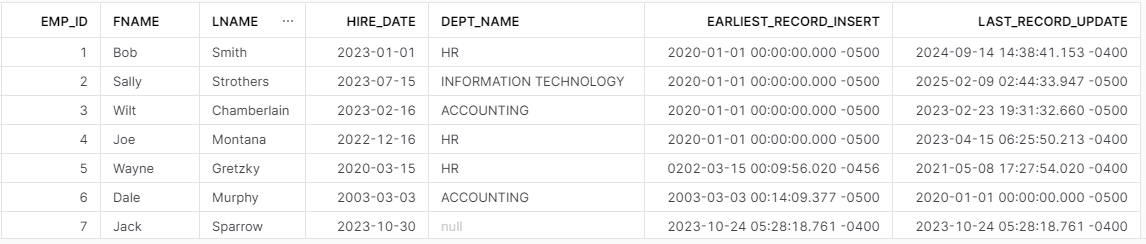
Employee list using Array_Max and Array_Min

Using ARRAY_MAX and ARRAY_MIN in the HR request now properly displays the earliest insert and latest update for new employee Jack Sparrow; which correspond to the insert and update date on his record in TBL_EMPLOYEE.

Wrapping Up

Snowflake’s GREATEST and LEAST functions operate similarly to those in SQL Server except for handling NULLS. SQL Server’s method is not superior, nor is Snowflake’s; they’re just different and it is up to the developer to understand the differences in how they operate.

Snowflake provides ARRAY_MAX and ARRAY_MIN as an alternative method when NULLs need to be ignored; however, my recommendation is to avoid using NULLs wherever possible.

Thought Leadership Q&A

In the summer of 2022, I was a panel member during a discussion on thought leadership during one of my employer’s innovation fireside chats. I had been asked to join the panel a few weeks prior on the topic of “thought leadership”. At the time, I wasn’t even sure what thought leadership was. I assumed it was some new business buzzword that was being thrown around on LinkedIn and other social platforms.

What is Thought Leadership?

My first task in being a part of this panel was to figure out what thought leadership even meant, and how am I a thought leader. With a few strokes of the keyboard and some Google-Fu, I found a good definition of thought leaders from Denise Brosseau, CEO of Thought Leadership Labs.

“Thought leaders are the informed opinion leaders and the go-to people in their field of expertise. They become the trusted sources who move and inspire people with innovative ideas; turn ideas into reality, and know and show how to replicate their success.”

Denise Brosseau
What is a Thought Leader

Now that I know what thought leadership is, I need to figure out how I fit into that category. What did I do that helped me stand out in such a way that I was considered to be a thought leader in my field? I never sought out to be in this category, I just do what I do because I enjoy my work, have a good work ethic, and like to solve problems.
Thankfully, some of the panel questions were provided ahead of time so we would have some time to prepare answers and not fill the time with lots of “Um” and “Uhh” as we contemplated them. Below are the questions as well as the thoughts I shared with our company.

Panel Discussion Questions

What does it mean to you to be a Thought Leader?

A thought leader is an expert in a particular field or topic who is sought out as a trusted source for innovative ideas based upon their prior experiences and expertise. A thought leader also can serve as a coach or mentor to others in that field.

Note: glad I had Googled what a thought leader was before this question and could put that into my own words.

What habits do you personally have that help you build Thought Leadership?

I “tinker”. I try new things, whether it be the latest database application or learning a new programming language, I get my “hands dirty”. Whatever I tinker with may not have specific application to my day job at the time, but it could be in the future. By having a little experience with something new, I have another tool to pull out of the toolbox if the job needs it.

I read newsletters, LinkedIn articles, and other social platforms for what’s trending in tech or business. A couple of my favorites are IT Brew and TLDR.

Network inside and outside the company. Find others internally that you can connect with doing similar work or even polar opposite work. Connect with clients to see how they’re solving problems internally. Listen to how others describe what they do. How do they solve problems? What pain point are they describing that they’ve not quite figured out yet? How can I help them?

How is Thought Leadership different in a virtual world?

Even with all the technological advancements in meeting applications, there is still something about gathering the team in a room, and “whiteboarding” is a problem. In virtual meetings, even with video, there’s non-verbal interaction missing. We’re all very easily distracted – email notifications popping up, instant messages, other people at home, the dog barking at the delivery guy, and a plethora of other distractions in today’s remote work environment.

All of those make it harder to be a thought leader because we are more connected to technology, but more disconnected to people than ever before. A good thought leader not only replies on personal experience and expertise but also on their ability to listen to problems that others are trying to solve. Sitting in our homes all day and missing the “office chatter” makes being that helping hand or listening ear challenging. We have to proactively communicate with others – make the time for regular team meetings or informal coffee chats. Call the project manager you haven’t talked to in several weeks.

As managers, how do you encourage Thought Leadership in your teams?

As leaders, our job is not to always have the perfect answer to every problem. We serve as the coach of the team and get the team all moving in the same direction toward our common goal. To encourage thought leadership in our teams we have to facilitate the things that we do as thought leaders for our teams.

I frequently bring a problem or challenge to the team and get their ideas on how we could solve it. During the discussion, I push the team to stretch their ideas and see how we can move from a tactical solution to the challenge toward something “bigger”. What crazy, off-the-wall idea can we throw at this issue?

During our team meetings, team members present what they’ve worked on recently or what solution to a problem they’ve seen that’s cool. Facilitating communication between our team members and across teams goes a long way toward building up other Thought Leaders.

What are strategies that you use to integrate your new ideas into solving client problems?

Listen to them. Don’t stare at them while thinking of the next words that will come out of your mouth. Listen to your client. In the best-case scenario, they point-blank tell you the problem they need help with. More than likely they describe all the symptoms of the problem without identifying the true problem. Only when we truly listen to our clients can we understand their needs and then present our ideas in the context of how we can help them with their “pain points.”

Look around. My primary role is “the data guy” and right now that world is ever-changing and evolving. By staying up-to-date on what’s new, what’s trending, or what companies have merged, I can keep a pulse on the overall industry and how that impacts the clients I work with. How do these things help our clients? While the shiny new thing is super cool, does it help move the needle for our clients? If it could, how do I effectively share my vision with them so they can see it too?

How can you start today to build Thought Leadership?

The question answers itself – start. Simply start. Start reading articles in an area you are passionate about. Sign up for newsletters to keep up-to-date on your industry; however, be selective on how many, they can get out of hand with the emails!

Brainstorm solutions to current client problems. Pick something small and sketch out a solution to discuss with your manager.

Take a class, either in person or virtually. Udemy is a great resource for learning new things. YouTube has millions of hours of content; however, be selective here too.

Don’t wait for things to come to you to solve. Take initiative – always be on the lookout for ways to innovate or present new ideas.

Wrapping Up

Thought Leadership isn’t a certification or degree earned through hours of classes or passing an exam; however, it does take time to develop. Some of the great thought leaders I’ve worked with in my career didn’t have a million certifications or fancy degrees, they were looked upon as leaders because they drove innovation. Not innovation specifically in a technological sense, but they facilitated the growth of new ideas.

Becoming a Thought Leader is akin to building a snowball. Start small with a little idea and as you roll the snowball over, it picks up more snow and grows larger. Repeat. Before long a snowball has grown exponentially larger; however, unless you first start rolling the snowball, it never grows. Just start.

Snowflake: Overloading Stored Procedures

In a previous post, I discussed some of the struggles I had with converting a stored procedure from SQL Server to Snowflake – namely, the ability to set input parameters to default values. One way to get around this issue is to “overload” the procedure in Snowflake. Snowflake supports polymorphism whereas SQL Server does not.

NOTE: Since this article was published, Snowflake added a feature to allow for default parameter values. See this post for an update.

What is Polymorphism?

Polymorphism, sometimes referred to as “overloading”, is defining a routine of the same name in the same namespace with a different number of inputs, or inputs of different types. We see this frequently in C++, C#, or Python where a single function like new() can take no parameters, or a dozen, or one. Each definition of new() can be handled differently and/or “nest” into another definition of new().

Using Polymorphism in Snowflake

Snowflake supports polymorphism with functions and stored procedures by permitting objects of the same name in the same schema but with different signatures. Using the example from the previous post for an event log handler, I’ll show how to deploy a stored procedure of the same name, but with a different signature.

Prior Stored Procedure Signature

In the previous post, I created a stored procedure USP_EVT_LOG that accepts two VARCHAR input parameters. During the creation, I attempted to set the EVT_TYPE parameter to a default value; however, ran into difficulty doing so. My SQL Server version used the default of “INFO” for EVT_TYPE to simplify procedure calls for non-error events. I got around the default issue by passing NULL for the EVT_TYPE parameter and handled the NULL via code.

/*CREATE PROC*/

CREATE OR REPLACE PROCEDURE USP_EVT_LOG(EVT_TYPE VARCHAR(10),EVT_DESC VARCHAR(1000))
RETURNS BOOLEAN
AS
BEGIN
    INSERT INTO TBL_EVT_LOG(EVT_TYPE,EVT_DESC)
    VALUES(COALESCE(:EVT_TYPE,'INFO'),:EVT_DESC);
    RETURN TRUE;
END;

/*SAMPLE CALLS*/
CALL USP_EVT_LOG(NULL,'Event written from proc');
CALL USP_EVT_LOG('ERROR','Error written from proc');

Creating a Second Stored Procedure

Using the object-oriented programming concept of polymorphism, I can create another stored procedure of the same name, but with a different signature to handle the missing default value. There are a few different options for doing so, one would be to replicate the “guts” of the original procedures and set the default in the insert statement. The disadvantage with this method is the code is now in two different places. If the table structure changes, I would need to alter two procedures to make changes.

Another option, and the one I’ll use, is to use the second procedure as a wrapper to the first procedure and call the first procedure from the second procedure passing my desired default value for EVT_TYPE.

CREATE OR REPLACE PROCEDURE USP_EVT_LOG(EVT_DESC VARCHAR(1000))
RETURNS BOOLEAN
AS
DECLARE
    RETURN_VALUE BOOLEAN DEFAULT FALSE;
BEGIN
    RETURN_VALUE := (CALL USP_EVT_LOG('INFO',:EVT_DESC));
    RETURN RETURN_VALUE;
END;

Notice that I had to define the proper return value variable and assign the output of the first stored procedure call to it, then return the value to get the same behavior as the original procedure. Failing to do so still creates a working procedure, but will return a NULL value. I now have two procedures of the same name but with different numbers of parameters.

Polymorphism Caveats

While creating two procedures with the same name and different signatures solved the default parameter value problem, it is not without its caveats.

Specify Arguments on Commands

Since each procedure is its own object, the argument types need to be included with any command that references the procedure by name, such as changing ownership.

GRANT OWNERSHIP ON PROCEDURE USP_EVT_LOG TO ROLE SYSADMIN;

The command above produces this error:

To properly change ownership, the arguments need to be included with the procedure name:

GRANT OWNERSHIP ON PROCEDURE USP_EVT_LOG(VARCHAR,VARCHAR) TO ROLE SYSADMIN;
GRANT OWNERSHIP ON PROCEDURE USP_EVT_LOG(VARCHAR) TO ROLE SYSADMIN;

The same applies to other types of commands including DROP or SET COMMENT.

COMMENT ON PROCEDURE USP_EVT_LOG(VARCHAR) IS 'DEFAULTS EVT_TYPE TO "INFO"';

Unique Argument Signatures

In my example, the second USP_EVT_LOG has a single VARCHAR input for EVT_DESC, but what if I wanted a third proc that had a single VARCHAR input for EVT_TYPE? Altering the original code to swap the input parameters doesn’t produce an error; however, it does replace the procedure I created earlier:

CREATE OR REPLACE PROCEDURE USP_EVT_LOG(EVT_TYPE VARCHAR(1000))
RETURNS BOOLEAN
AS
DECLARE
    RETURN_VALUE BOOLEAN DEFAULT FALSE;
BEGIN
    RETURN_VALUE := (CALL USP_EVT_LOG(:EVT_TYPE,'DEFAULT DESCRIPTION'));
    RETURN RETURN_VALUE;
END;

Notice I still have only two procedures after executing the code above:

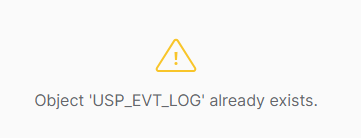
If I remove “OR REPLACE” from the code block above, I get an error that USP_EVT_LOG already exists, meaning procedure signatures must be unique by name, argument number, and type.

Conclusion

Snowflake supports polymorphism by allowing objects of the same name in the same namespace which can be used to create different results or use a different set of inputs; however, doing so is not without its own set of caveats to keep in mind when using this feature.